Chapter 5 Textbook Assignment
Purpose: Practice creating a variety of aggregate queries and summary queries
To see a video demonstration of tasks 1 through 4, view: https://youtu.be/TCR6v6jMik0
To see a video demonstration of task 5, view: https://youtu.be/tH8krmsJ9eQ
To see a video demonstration of task 6, view: https://youtu.be/nnqnXTdzyOQ
Task #1: Using the MIN() Aggregate function
Scenario: Let’s say our boss wanted to find who had the lowest amount due (or the minimum due) on outstanding invoices. To answer their question, we would need to use the AP database and the Invoices table. We would also need to use the MIN function to retrieve the lowest amount.
1. Launch SSMS and create a new query
2. Enter a heading of Task #1 and comment out the heading
3. Enter the following aggeregate query:
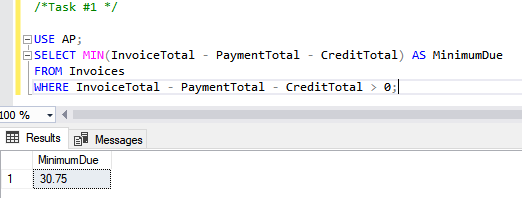
4. Execute the query
5. Save the assignment as chapter5-textbook-assignment.sql
6. Comment out the query
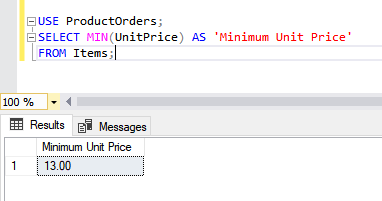
Scenario: Let’s say our boss wants to know which item has the lowest unit price. To answer their question, we would need to use the ProductOrders database and the Items table.
1. Enter the following query:
2. Comment out the query
3. Save your changes.
Task #2: Using the MAX() Aggregate function
Scenario: Now your boss wants the maximum and minimum invoice amount due.
1. Enter the heading, Task #2, and comment it out.
2. To provide the information, we will copy/paste our first query and modify it.
USE AP;
SELECT MIN(InvoiceTotal - PaymentTotal - CreditTotal) AS MinimumDue,
MAX(InvoiceTotal - PaymentTotal - CreditTotal) AS MaximumDue
FROM Invoices
WHERE InvoiceTotal - PaymentTotal - CreditTotal > 0;
3. Execute the query
4. Save your changes
5. Comment out the query
Scenario: Our boss wants a listing of the highest sales and lowest sales.
1. To provide the information, we need to use the Examples database and the SalesTotals table
USE Examples;
Select MAX(SalesTotal) AS 'Highest Sales', MIN(SalesTotal) AS 'Lowest Sales'
FROM SalesTotals;
2. Execute the query
3. Save your changes
4. Comment out the query
Task #3 Using the COUNT() Function
Scenario: Our boss would like to know how many customers live in Illinois. To answer their question, we need to use the Examples database and the Customers table
1. Enter a heading of Task #3 and comment it out.
2. To answer the bosses question, enter the following query:
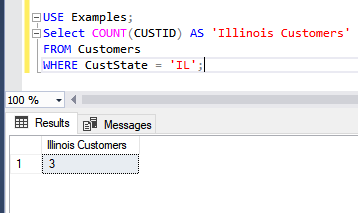
2. Execute the query
3. Comment out the query and save your changes.
Scenario: Our boss wants to know which vendor’s name is last in the list and first in the list and how many vendors we have in the AP database (NOTE: You can also use the Examples database - they will yield the same results)
1. Enter the following query:
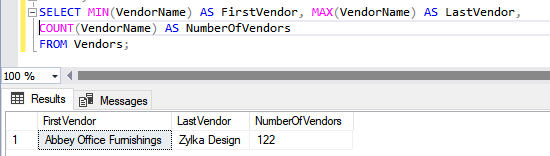
2. Execute the query – you should note that MAX and MIN can be used on alphabetic columns or numeric columns
3. Comment out the query and save your changes.
Scenario: Now our boss would like to know how many total customers we have.
1. Copy/paste the last query and change it to:
USE Examples;
Select COUNT(*) AS 'ALL Customers'
FROM Customers;
2. Execute the query.
3. Comment out the code and save your changes.
Scenario: Our boss would like to know the following: how many investors we have, what the maximum net gain is and what the minimum net gain is. To answer the questions, we need to use the Investors table in the Examples database.
1. Enter the following query:
USE Examples;
SELECT COUNT(InvestorID) AS [Number of Investors], MAX(NetGain) AS [Max Net Gain], MIN(NetGain) AS [Min Net Gain]
FROM Investors;
2. Execute the query.
3. Comment out the code and save your changes.
Task #4: Using the AVG() function
Scenario: Our boss would like us to adjust our last query to include the average NetGain.
1. Enter the heading, Task #4, and comment out the code.
2. Copy/paste the last query and add AVG(NetGain) as shown below:
![USE Examples;SELECT COUNT(InvestorID) AS [Number of Investors], MAX(NetGain) AS [Max Net Gain], MIN(NetGain) AS [Min Net Gain], AVG(NetGain) AS [Average Gain]FROM Investors;](media/max-min-average-functions.PNG)
3. Execute the query
4. Comment out the query and save your changes.
Task #5: Using the SUM() function
Scenario: Our boss wants a total for all Invoices in the second half of 2019
1. Enter the heading, Task #5, and comment out the code
2 To provide the information, we need to use the AP database and the Invoices table. The column we need to look at is InvoiceTotal
USE AP;
Select SUM(InvoiceTotal) AS "Total Invoices"
FROM Invoices
WHERE InvoiceDate BETWEEN '2019-06-01' AND '2019-12-31';
3. Execute the query
4. Comment out the query and save your changes.
Scenario: Our boss wants the number of vendors, the number of vendor invoices, the average invoice amount and the total invoice amount. They only want data after 1/1/2020 AND the number vendors shouldn’t be duplicated.
To provide this, we need to use the AP database and the Invoices table. We need to count the vendors (we can use VendorID for that with the DISTINCT keyword). We also need to count the number of invoices (we can also use VendorID, but we don’t want DISTINCT because we want to know if they did more than 1). For the average and total, we can use the InvoiceTotal column
1. Our query should look something like this:
USE AP;
SELECT COUNT(DISTINCT VendorID) AS '#Vendors', COUNT(VendorID) AS '#Invoices', AVG(InvoiceTotal) AS 'Invoice Average', SUM(InvoiceTotal) AS 'Invoice Total'
FROM Invoices
WHERE InvoiceDate > '2020-01-01';
2. Execute the query
3. Comment out the query and save your changes.
Task #6: GROUPING BY and HAVING clauses
Scenario: Our boss would like to see the average invoice amount from vendors and would like to see the vendor id next to the average. To see who the big spenders are, they would like to see the data sorted by the average amount in descending order.
1. Enter the heading, Task #6, and comment out the code
2. Create the following query to accomplish this:
![USE AP;SELECT VendorID, AVG(InvoiceTotal) AS [Invoice Average] FROM Invoices GROUP BY VendorID ORDER BY AVG(InvoiceTotal) DESC;](media/grouping-exercise.PNG)
3. Execute the query
4. Comment out the query
Scenario: Our boss would like to see more of a breakdown – they would like the Vendor State, Vendor City, total Invoice Quantity and Average Invoice total grouped by vendor state and vendor city.
To accomplish this, we need to use the AP database and retrieve data from the Vendors and Invoices tables (this requires a JOIN statement) We also need to total InvoiceQty and average InvoiceTotal.
1. Enter the following select:
USE AP;
SELECT VendorState, VendorCity, COUNT(*) AS InvoiceQty, AVG(InvoiceTotal) AS InvoiceAvg
FROM Invoices
JOIN Vendors ON Invoices.VendorID = Vendors.VendorID
GROUP BY VendorState, VendorCity
ORDER BY VendorState, VendorCity;
2. Execute the query
3. Save your changes and comment out the query
Scenario: Apparently, we have too much data, so our boss wants the query adjusted to show rows with an average invoice total greater than 50.
To accomplish this, we are going to add a HAVING statement
1.Copy/paste the last query and add the having statement highlighted below:
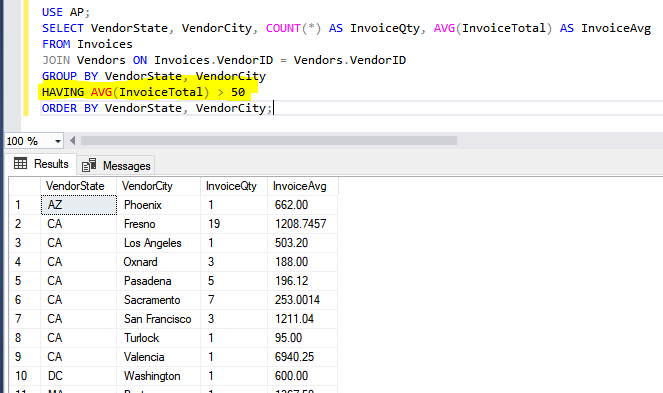
2. Execute the query
3. Save your changes and comment out the query.
Scenario: Our boss would like to see the reps whose total sales are over 500,000 and whose minimum sales are over 100,000
To provide this information, we need to use 2 tables in the Examples database: SalesTotals and SalesReps. The common field between the tables is RepID, so that is the field we need to join the tables on. We will need the MAX(SalesTotal) and the MIN(SalesTotal) In addition to the RepID Since we are NOT using a function on RepID AND we need totals for the reps, we are going to GROUP BY RepID
Our query needs to look something like this:
USE Examples;
SELECT SalesTotals.RepID, Max(SalesTotal) AS 'High Sales', MIN(SalesTotal) AS 'Low Sales'
FROM SalesTotals JOIN SalesReps ON SalesReps.RepID = SalesTotals.RepID
GROUP BY SalesTotals.RepID
HAVING Max(SalesTotal) > 500000 AND MIN(SalesTotal)>100000;
1. Enter the query and execute it. You should see 3 reps listed.
2. Comment out the query and save your changes.
3. Upload the assignment to the dropbox in Moodle