Chapter 7 Textbook Assignment
Purpose: Practice creating tables, dropping tables, modifying rows, deleting rows and inserting rows
Task #1: Create a table by copying data from an existing table
To see a video demonstration showing how to complete task #1, view: https://youtu.be/YpLfUlihd5U
Scenario: Our boss would like us to make a copy of the invoice table for testing purposes
1. Launch SSMS and create a new query
2. Enter a heading of Task #1 and comment out the heading
3. Enter the code shown below
USE AP;
SELECT * INTO
InvoiceCopy
FROM Invoices;
a) Execute the select
b) Comment
out the statements
c) Save the file as:
chapter7-textbook-assignment.sql
Scenario: Our
boss would like us to delete the InvoiceCopy table we created earlier
and copy specific columns from Invoices into InvoiceCopy rather than
all columns
1. Enter the following code to drop the existing table:
USE AP;
DROP TABLE InvoiceCopy;
a) Execute the query, comment
out the query and save your changes
b) Execute the SELECT INTO query to create InvoiceCopy, but only choose the following columns from the Invoices table: InvoiceID, InvoiceNumber, InvoiceTotal
c) Run a normal select to view rows copied into InvoiceCopy and comment out the command
d) Set InvoiceID as the primary key in the InvoiceCopy table and comment out the command
Task#2: Creating an archive table
To see a video demonstration, watch: https://youtu.be/2FrdFQArxt0
Scenario: Our boss would like us to create an PaidInvoice table that contains 5 columns: Invoice ID, Invoice Date,PaymentTotal, CreditTotal and InvoiceTotal. They only want invoices with a current balance of zero added to the table (InvoiceTotal-PaymentTotal-CreditTotal=0)
1 Enter a heading of task #2 and comment it out
2 Enter the query, comment out the query and save your changes
3 Run a select to view all the records and comment out your code.
Q: How do you know the PaidInvoice table was created correctly?
The payment total and the credit total should equal the invoice total
Task #3: Creating an empty table using the columns from an existing table
To see a video demonstration, watch: https://youtu.be/uc-aRfTKxm4
Scenario: Our boss would like us to create a customers table that includes the same columns as the Northwinds customer table, but not any of the rows. He would like this table added to the testDB database
1 Enter a heading of task #3 and comment it out
2 To create the database (if it doesn't exist) enter: CREATE DATABASE testDB; Comment out the code
NOTE: If the database does exist, we are going to delete it so we can start fresh. Enter DROP DATABASE testDB; Execute the code and then enter CREATE DATABASE testDB;
3 Enter a select into query to select all columns and add a where clause that won't find any rows (WHERE 1=0 will never find any rows)
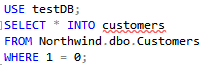
4 Comment out the code and check in testDB to
make sure the customers table is there and that the columns were
created.
5 Set CustomerID as the primary key in the new customers table, execute the command and comment out the code and save your changes.
Task #4: Add records to the new Customer table
To see a video demonstration, watch: https://youtu.be/CQqRlC2eywk
Scenario: Our boss would like us to enter test data into customers
1. Enter a heading of task #4 and comment it out
2. Use the following insert statements to add records to Customers:

INSERT INTO customers VALUES
('az99','Pappa Johns','Jenny
Jones','General Manager','5 Airport Drive', 'Traverse City',
'MI','49696','USA','(231)-777-1234','NULL'),
('bb2','Costco','Erin Rodriguez','Manager','110 Airport Drive',
'Traverse City', 'MI','49696','USA','(231)-999-9999','NULL'),
('cbc44','TJ Maxx','Amy Juarez','General Manager','102 Ventura
Blvd', 'Traverse City', 'MI','49696','USA','(231)-515-1234','NULL');
a) Run the queries
b) Comment out the code
c) Save your changes.
Task #5: Copying data from Northwinds into our customer table
To see a video demonstration, watch: https://youtu.be/a18TCsQMGOI
Scenario: Our Boss would like us to copy Northwinds customers who are in the USA into our customers table
1. Enter the heading, task #5, and comment it out
a) Enter the INSERT INTO
command limiting records to Country='USA'
b) Run the
command and comment it out
2. Run a select to view all
the records in the customers table and comment out the code.
3. Backup the testDB database (we are going to be
changing and deleting rows, it is always best to do a backup before
changing data)
Task #6: Maintaing data within our tables
To see a video demonstration, watch: https://youtu.be/13aNA_rv_KE
Scenario: Our boss would like us to modify the information for CustomerID xyz10
1. Enter the heading task #6 and comment it out
ContactName=Jill
ContactTitle=Owner
Address=123
Main Street
City=Traverse City
Region=MI
PostalCode=49696
Country=USA
Phone=(231)222-3333
a) enter the following commands and execute them.
Comment out the code when you are done

Q: Is the UPDATE command a DDL or DML command?
A: It is a DML command (DML commands affect data in the tables)
Scenario: Our boss would like us to remove the
Fax column from the customer table and insert an email column
instead
1 Enter the following comamnds and execute them. Comment out the code when you are done
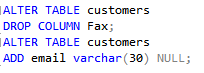
Q: Are the ALTER TABLE, DROP COLUMN and ADD COLUMN commands DDL or DML commands?
A: They are DDL commands because they modify the structure of the tableQ: Why is the new email column allowing NULL values?
A: Because rows already exist in the table that do not have any data entered for that column4. Update email addresses for the following customers
CustomerID: abc12 email: frankie@abcwarehouse.com
CustomerID: LETSS email: JYorres@stopnshop.net
CustomerID: WHITC email: management@whiteclover.com
CustomerID: xyz10 email: bertha@berthasbakery.net
CustomerID: RATTC email: bite@rattlesnakecanyon.com
NOTE: You need to use SET along with WHERE
Comment out the code when you are done and save your changes.
2. Delete all customers with a region of WY. You should see 1 customer deleted. Comment out the code when you are done and save your changes
Q: What should we do if we accidentally delete all the rows in our table?
A: Restore the database from the backupTask #7: Merging tables
To see a video demonstration, watch: https://youtu.be/wHhZMZ6d1O0
Scenario: Our Boss wants us to test merging two tables. They would like us to merge foreign customers from Northwinds with our customers table.
1. Enter a heading of Task #7 and comment out the code
a) Create a ForeignCustomer table using Northwinds data
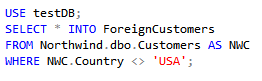
After executing the command, comment out your code
b) Merge ForeignCustomers and customers
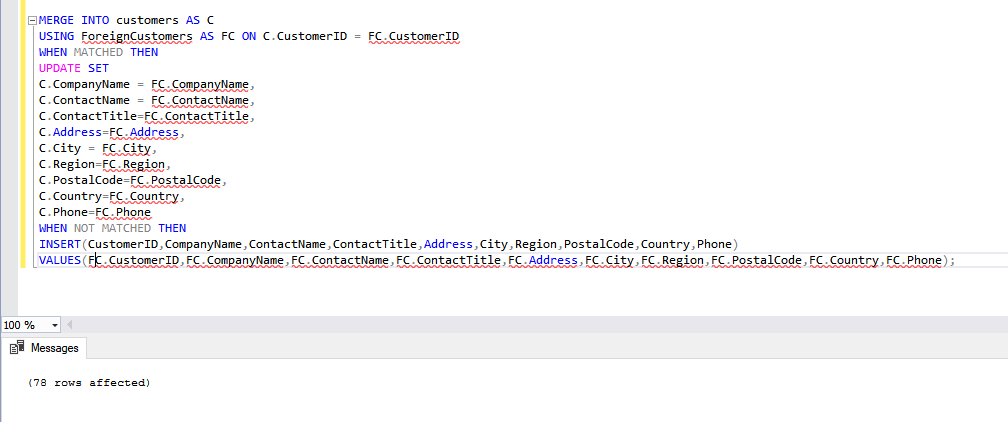
c) Enter the commands shown above, execute the code and comment out the code.
d) Run a select on the customers table to view the new records.
e) Comment out the code and save your changes.
2. Upload the assignment to the dropbox in Moodle.