Chapter 9 Keypoints: How to Use Functions
I. Overview:
The chapter covers a wide variety of SQL functions with examples of
how to use them. Functions can be used in a wide variety of SQL
statements and clauses including: SELECT, WHERE, ORDER BY and GROUP BY.
Functions are simply routines that perform tasks for you. Many
functions require parameters (data) to work correctly. Parameters
are sent to functions in the parenthesis that follow the function name.
If the function does not require parameters, you still must include the
parenthesis. Most functions will return data which you can
store in a column or use in a calculation or comparison.
II. String Functions
String functions are designed to manipulate character strings
1. LEN(STRING)
Returns the length of a string (it includes leading spaces, but does
NOT include trailing spaces)
Example:
SELECT LEN('I LOVE RELATIONAL DATABASES!') AS favoriteClassLength;
Try running this in SSMS
2. LTRIM(STRING)
Removes leading spaces from a string.
Example:
SELECT LTRIM('
SQL Tutorial') AS LeftTrimmedString;
Try it live:
https://www.w3schools.com/sql/trysqlserver.asp?filename=trysql_func_sqlserver_ltrim
3. RTRIM(STRING)
Returns trailing spaces from a string. NOTE: To remove
spaces from the front and end, use both LTRIM and RTRIM
4. LEFT(STRING,LENGTH)
Returns the specified number of characters from the beginning of the
string. Where LENGTH is the number of characters you want
returned.
Example:
SELECT LEFT('SQL is awesome!',3) AS shortString;
Try running this in SSMS
5. RIGHT(STRING,LENGTH)
Returns the specified number of characters from the end of the
string. Where LENGTH is the number of characters you want
returned.
6. SUBSTRING(STRING,START,LENGTH)
Returns the specified number of characters from the string starting
at the specified position.
Example:
SELECT SUBSTRING('I love chocolate', 8, 9) AS favoriteFood;
Try running this in SSMS
7. REPLACE(SEARCH,FIND,REPLACE)
Returns the search string with all occurrences of the find string
replaced with the replace string.
Example:
SELECT REPLACE('MongoDb is a popular database', 'MongoDb', 'SQL
Server') AS 'bestDatabase';
Try running this in SSMS
8. REVERSE(STRING)
Returns the string with the characters in reverse order.
Example:
SELECT REVERSE('123321') AS 'reversedButTheSame';
SELECT REVERSE('Jack O Lantern') AS 'holidayObjects';
Try running this in SSMS
9. CHARINDEX(FIND,SEARCH[,START])
Searches for a character or string in another string and returns the
integer value of the first occurence. The start parameter is
optional (you can indicate where i the search string, you want to start
looking). If the string isn’t found, the function returns zero.
Example:
SELECT CHARINDEX('.','Twinkle, Twinkle, Little Star. How I
wonder what you are.');
SELECT CHARINDEX('.','Twinkle, Twinkle, Little Star. How I
wonder what you are.',35);
Try running this in SSMS
1O. PATINDEX(FIND,SEARCH)
Returns the position of a pattern in a string. If the pattern
isn’t found, the function returns zero. The find pattern can include
wildcard characters. If the pattern begins with a wildcard, the value
returned is the position of the first non-wildcard character.
Example:
SELECT PATINDEX('%star%','Twinkle, Twinkle, Little Star. How I
wonder what you are');
Try running this in SSMS
11. CONCAT(VALUE1,VALUE2[,VALUE3]...
Returns a string that contains a concatenation of the specified
values. The values are implicitly converted to strings. A null value is
converted to an empty string.
Example:
SELECT CONCAT('Every Who Down in Whoville Liked Christmas a lot... ',
'But the Grinch,', 'Who lived just north of Whoville,', 'DID NOT!');
Try running this in SSMS
NOTE: You can also concatenate using the + sign
12. LOWER(STRING)
Returns the string converted to lowercase letters.
Example:
SELECT LOWER(CustomerName) AS LowercaseCustomerName
FROM
Customers;
Try it live:
https://www.w3schools.com/sql/trysqlserver.asp?filename=trysql_func_sqlserver_lower2
13. UPPER(STRING)
Returns the string converted to uppercase letters.
14. SPACE(INTEGER)
Returns a string with the specified number of space characters
(blanks).
III. Numeric Functions
Numeric functions round numbers, retreive random numbers and perform
calculations
1. ROUND(NUMBER,LENGTH [,FUNCTION])
Returns the number rounded to the precision specified by length. If
length is positive, the digits to the right of the decimal point are
rounded. If it’s negative, the digits to the left of the decimal point
are rounded. To truncate the number rather than round it, code a
non-zero value for function.
Examples:
ROUND(12.5,0)= 13.0
ROUND(12.4999,0) = 12.0000
ROUND(12.4999,1) 12.5000
2. ISNUMERIC(EXPRESSION)
Returns a value of 1 (true) if the expression is a numeric value;
returns a value of 0 (false) otherwise.
Examples:
ISNUMERIC(-1.25) 1 (true)
ISNUMERIC('SQL Server') 0 (false)
ISNUMERIC('2016-09-30') 0 (false)
3. ABS(NUMBER)
Returns the absolute value of the number.
Example:
ABS(-1.25) returns +1.25
4. CEILING(NUMBER)
Returns the smallest integer that is greater than or equal to the
number.
Example:
CEILING(-1.25) returns -1
CEILING(1.25) returns 2
5. FLOOR(NUMBER)
Returns the largest integer that is less than or equal to the number.
Example:
FLOOR(-1.25) returns -2
FLOOR(1.25) returns 1
6. SQUARE(FLOAT_NUMBER)
Returns the square of a floating-point number. NOTE: To calculate the
square or square root of a number with a data type other than float or
real, you must cast it to a floating-point number.
Example:
SQUARE(10) returns 100
7. SQRT(FLOAT_NUMBER)
Returns the square root of a floating-point number. NOTE: To
calculate the square or square root of a number with a data type other
than float or real, you must cast it to a floating-point number.
Example: SQRT(100) returns 10
8. RAND([INTEGER])
Returns a random floating-point number between 0 and 1
IMPORTANT: To generate random numbers, RAND requires a seed value.
Using CHECKSUM(NEWID()) provides a changing seed value for RAND to
use when generating the numbers NEWID() is designed to generate a unique
identifier. That unique identifier is then used by CHECKSUM which uses
an algorithm to produce another unique computed value (normally,
CHECKSUM is used to ensure that data is transmitted accurately – a value
is calculated and then checked at the receiving end)
Examples:
RAND() returns a number between 0 and 1
RAND( CHECKSUM( NEWID())) returns a truly random number between 0 and
1
RAND( CHECKSUM( NEWID())) * 100 returns a truly random number between
0 and 100
CAST(RAND( CHECKSUM( NEWID())) * 100 AS INT) returns a truly random
whole number between 0 and 100
IV. Date/Time Functions
NOTE: The date examples below use a system date of 2/25/2018
1. GETDATE()
Returns a datetime value for the current local date
and time based on the system’s clock.
Example:
SELECT GETDATE()
returns: 2018-02-25 20:12:58.130
2. GETUTCDATE()
Returns a
datetime value for the current UTC date and time based on the system’s
clock and time zone setting.
Example:
SELECT GETUTCDATE() returns:
2018-02-26 01:12:58.130
3. SYSDATETIME()
Returns a
datetime2(7) value for the current local date and time based on the
system’s clock.
Example:
SELECT SYSDATETIME() returns: 2018-02-25
20:16:20.6752109
4. SYSUTCDATETIME()
Returns a datetime2(7) value
for the current UTC date and time based on the system’s clock and time
zone setting.
Example:
SELECT SYSUTCDATETIME() returns: 2018-02-26
01:16:20.6908374
5. SYSDATETIMEOFFSET()
Returns a
datetimeoffset(7) value for the current UTC date and time based on the
system’s clock and time zone setting with a time zone offset that is not
adjusted for daylight savings time.
Example:
SELECT
SYSUTCDATETIME() returns: 2018-02-25 20:19:07.8001579 -05:00
6.
DAY(DATE)
Returns the day of the month as an integer.
Example:
SELECT DAY(GETDATE()) returns: 25
7. MONTH(DATE)
Returns the
month as an integer.
Example:
SELECT MONTH(GETDATE()) returns: 2
8. YEAR(DATE)
Returns the 4-digit year as an integer.
Example:
SELECT YEAR(GETDATE()) returns: 2018
9. DATENAME(DATEPART,DATE)
Returns the part of the date specified by datepart as a character
string.
Example:
SELECT DATENAME(Month,GETDATE()) returns February
SELECT DATENAME(Year,GETDATE()) returns 2018
10.
DATEPART(DATEPART,DATE)
Returns the part of the date specified by
datepart as an integer.
Example:
SELECT DATEPART(Month,GETDATE())
returns 2
SELECT DATEPART(Year,GETDATE()) returns 2018
11.
DATEADD(DATEPART,NUMBER,DATE)
Returns the date that results from
adding the specified number of datepart units to the date.
Example:
SELECT DATEADD(Month,30,GETDATE()) AS ExpirationMonth returns 2022-04-28 08:51:24.697
SELECT DATEADD(DAY,30,GETDATE()) AS ExpirationDay returns 2019-11-27 08:50:28.220
12.
DATEDIFF(DATEPART,STARTDATE,ENDDATE)
Returns the number of datepart
units between the specified start and end dates.
13.
TODATETIMEOFFSET(DATETIME2,TZOFFSET)
Returns a datetimeoffset value
that results from adding the specified time zone offset to the specified
datetime2 value.
14. SWITCHOFFSET(DATETIMEOFFSET,TZOFFSET)
Returns
a datetimeoffset value that results from switching the time zone offset
for the specified datetimeoffset value to the specified offset.
15.
EOMONTH(STARTDATE[,MONTHS])
Returns a date for the last day of the
month specified by the start date. If months is speci- fied, the number
of months is added to the start date before the end-of-month date is calculated.
Example: Select EOMONTH(GETDATE()) returns 2018-02-28
16. DATEFROMPARTS(YEAR,MONTH,DAY)
Returns a date for the
specified year, month, and day.
17. ISDATE(EXPRESSION)
Returns a
value of 1 (true) if the expression is a valid date/time value; returns
a value of 0 (false) otherwise.
V. Other Functions
The other functions in SQL resemble structured programming
statements. They include a case structure (similar to a nested
if/else or switch), an IIF function which is similar to an if/else
statement, a CHOOSE statement which is similar to an enum statement, in
addition to other functions that are unique to SQL or SQL Server.
A. CASE function
Evaluates conditions and returns a value when the first condition is
true. If no condition is true, then it returns the results in the else-expression
Syntax:
CASE INPUT_EXPRESSION
WHEN expression1 THEN
result-expression
WHEN expression2 THEN result-expression
ELSE
else-expression
END
Example #1:
SELECT OrderID, Quantity,
CASE
WHEN Quantity > 30 THEN "The quantity is greater than 30"
WHEN Quantity = 30 THEN "The quantity is 30"
ELSE "The quantity is
something else"
END
FROM OrderDetails;
Try it live: https://www.w3schools.com/sql/trymysql.asp?filename=trysql_case
Example #2:
SELECT CustomerName, City, Country
FROM Customers
ORDER BY
(CASE
WHEN City IS NULL THEN Country
ELSE City
END);
Try it live: https://www.w3schools.com/sql/trymysql.asp?filename=trysql_case2
B. IIF function
Returns one of two values, depending on whether the Boolean
expression evaluates to true or false
Syntax:
IIF (
boolean_expression, true_value, false_value )
Example #1
USE
Examples;
SELECT IIF(INVOICEDUEDATE>GETDATE(),'TRUE','FALSE')
FROM
ActiveInvoices;
Example #2
USE Examples;
SELECT VendorID,
InvoiceID, IIF(CreditTotal>50,'TRUE','FALSE') AS Discount
FROM
ActiveInvoices;
C. CHOOSE Function
The CHOOSE function provides an index into a list of values. The
index value must be a type that can be converted to an int value and it
must range from 1 to the number of values in the list.
Syntax:
CHOOSE(index, value1, value2 [,value3]...)
Example #1:
SELECT
CHOOSE ( 3, 'Manager', 'Director', 'Developer', 'Tester' ) AS Result;
Example #2:
USE AdventureWorks2012;
SELECT JobTitle,
HireDate, CHOOSE(MONTH(HireDate),'Winter','Winter',
'Spring','Spring','Spring','Summer','Summer','Summer','Autumn','Autumn','Autumn','Winter')
AS Quarter_Hired
FROM HumanResources.Employee
WHERE
YEAR(HireDate) > 2005
ORDER BY YEAR(HireDate);
D. COALESCE Function
The COALESCE function returns the first expression in a list of
expressions that isn’t null. To use this function, all of the expressions in the list must
have the same data type. If all the expressions are null, this function
returns a null value
Syntax:
COALESCE(columnName1, columnName2, columnNamen)
Example:
SELECT Name, Class, Color,
ProductNumber,
COALESCE(Class, Color, ProductNumber) AS FirstNotNull
FROM Production.Product;
E. ISNULL Function (Unique to SQL Server)
Replaces NULL values with a specified replacement value.
Syntax:
ISNULL ( check_expression , replacement_value )
Example: If the
value in Weight is NULL, it is replaced with 50
USE
AdventureWorks2012;
SELECT AVG(ISNULL(Weight, 50))
FROM
Production.Product;
Example: If the MaxQty is NULL It is replaced
with 0.00
USE AdventureWorks2012;
SELECT Description,
DiscountPct, MinQty, ISNULL(MaxQty, 0.00) AS 'Max Quantity'
FROM
Sales.SpecialOffer;
F. GROUPING Function
Can be used if you have a GROUP BY clause to indicate if a column in
a GROUP BY list is aggregated or not.
GROUPING looks at the result set
and returns 1 for aggregated or 0 for not aggregated.
GROUPING can
be used in the SELECT list, HAVING, and ORDER BY clauses when GROUP BY
is specified.
You can use the GROUPING function to determine when a
null value is assigned to a column as the result of the ROLLUP or CUBE
operation. By identifying the NULL value, you can give it text to
display (instead of NULL).
If a null value is assigned to the specified
column as the result of the ROLLUP or CUBE operator, the GROUPING
function returns a value of 1. Otherwise, it returns a value of 0.
GROUPING is used within the CASE function which checks if GROUPING
returns a 1 and then indicates what text should display for a 1 value
and what should display for anything else
Example:
CASE
WHEN GROUPING(VendorState) = 1 THEN 'All'
ELSE VendorState
END AS
VendorState
Syntax:
Grouping (columnName)
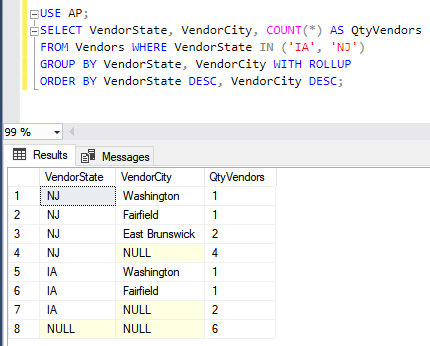
Example
without using Grouping function
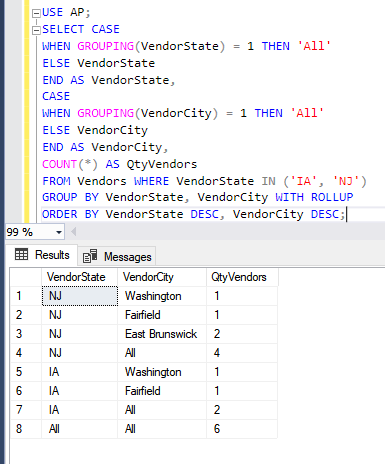
Example of how to use GROUPING to assign a column name for total
rows. Note that CASE is used for the VendorState column AND a second
CASE is used for VendorCity because those are the 2 columns that display
NULL when totaling The condition it is checking is true (=1 means true):
G RANKING FUNCTIONS
There are
4 different ranking functions. They are used to return a ranking value
for each row in a partition. Depending on the function that is used,
some rows might receive the same value as other rows.
a) RANK()
Returns the rank
of each row within the partition of a result set.
The rank of a row is
one plus the number of ranks that come before the row in question.
It can be used to provide sequential numbering of a selected column
Syntax:
RANK ( ) OVER
( [ partition_by_clause ] order_by_clause )
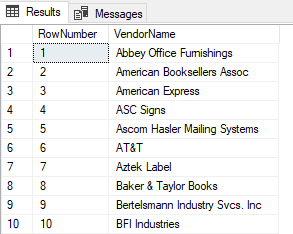
Example:
SELECT RANK() OVER(ORDER BY VendorName) AS RowNumber, VendorName FROM
Vendors
Partial Result Set:
b) ROW_NUMBER()
Numbers all rows sequentially (for example 1, 2, 3, 4, 5).
Syntax:
ROW_NUMBER ( ) OVER ( [ partition_by_clause ] order_by_clause
)
Example: SELECT ROW_NUMBER() OVER(ORDER BY VendorName)
AS RowNumber, VendorName FROM Vendors
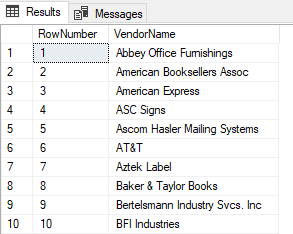
NOTE: The result set is
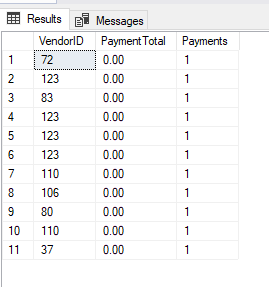
identical to RANK(). You will only see a difference if there are ties in
the ranking. In the case of ties, RANK() will assign the same number,
but ROW_Number will not (it will continue assigning sequential numbers)
Example showing the difference between RANK() and ROW_NUMBER()
USE Examples;
SELECT VendorID, PaymentTotal, ROW_NUMBER() OVER
(ORDER BY PaymentTotal) AS Payments
FROM ActiveInvoices;
Result Set (note how the payment numbers are increasing):
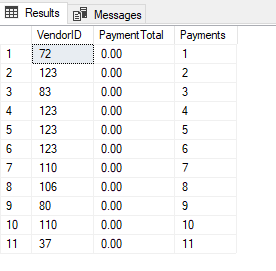
Here’s the same query with RANK() instead of ROW_NUMBER()
USE
Examples;
SELECT VendorID, PaymentTotal, RANK() OVER (ORDER BY
PaymentTotal) AS Payments
FROM ActiveInvoices;
Result Set:
c) NTILE()
Distributes the rows in an ordered
partition into a specified number of groups. The groups are numbered,
starting at one. For each row, NTILE returns the number of the group to
which the row belongs. (NOTE: If you have used an airline recently, you
may have noticed that passengers are placed into groups that determine
when they can board, that is a real-life example of this feature at
work)
Syntax:
NTILE (integer_expression) OVER ( [
<partition_by_clause> ] < order_by_clause > )
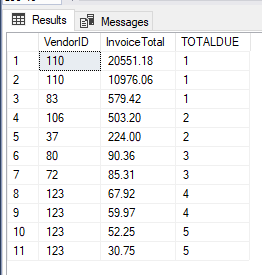
Example: In the
example, the results are split into 5 groups. They are given ranking
values of 1 through 5 depending upon how they fit into the range of
values
USE Examples;
SELECT VendorID, InvoiceTotal, NTILE(5)
OVER (ORDER BY InvoiceTotal DESC) AS TOTALDUE
FROM ActiveInvoices;
Result Set:
d) DENSE_RANK()
Returns the rank
of rows within the partition of a result set, without any gaps in the
ranking. The rank of a row is one plus the number of distinct ranks that
come before the row in question. Rows that have the same value will have
the same rank
Syntax:
ROW_NUMBER ( ) OVER ( [
partition_by_clause ] order_by_clause )
Example #1:
USE
AdventureWorks2012;
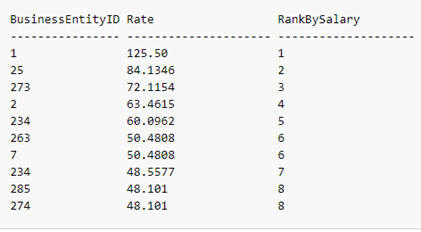
SELECT TOP(10) BusinessEntityID, Rate,
DENSE_RANK() OVER (ORDER BY Rate DESC) AS RankBySalary
FROM
HumanResources.EmployeePayHistory;
Result Set:
Example #2:
USE Examples;
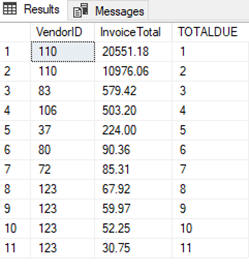
SELECT VendorID, InvoiceTotal,
DENSE_RANK() OVER (ORDER BY InvoiceTotal DESC) AS TOTALDUE
FROM
ActiveInvoices;
Result Set:
H. Analytic Functions
Analytic functions are used to retrieve the first value in an ordered
set, the last value in an ordered set, to compare values among rows and
to calculate percentiles within a distribution of values.
There are 6 analytic functions commonly used:
a) First_Value
Returns the first value in an ordered set of values
Syntax:
FIRST_VALUE ( [scalar_expression ] )
OVER ( [ partition_by_clause ]
order_by_clause [ rows_range_clause ] )
Example:
USE AdventureWorks2012;
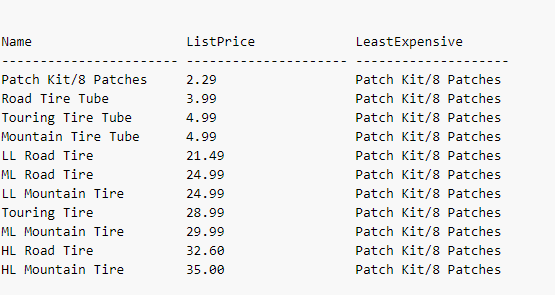
SELECT Name, ListPrice,
FIRST_VALUE(Name) OVER (ORDER BY ListPrice ASC) AS LeastExpensive
FROM Production.Product
WHERE ProductSubcategoryID = 37;
Result Set:
b) LAST_VALUE
Returns the last value in an ordered set of values
Syntax:
LAST_VALUE ( [scalar_expression )
OVER ( [ partition_by_clause ]
order_by_clause rows_range_clause )
c) Lead
Used to compare values in the current row to values in a following row
Syntax:
LEAD ( scalar_expression [ ,offset ] , [ default ] )
OVER ( [
partition_by_clause ] order_by_clause )
Example:
USE AdventureWorks2012;
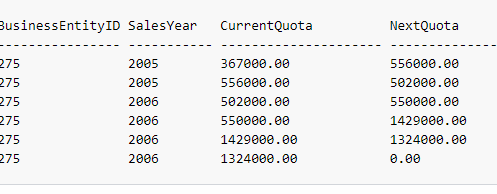
SELECT BusinessEntityID, YEAR(QuotaDate) AS
SalesYear, SalesQuota AS CurrentQuota,
LEAD(SalesQuota, 1,0) OVER
(ORDER BY YEAR(QuotaDate)) AS NextQuota
FROM
Sales.SalesPersonQuotaHistory
WHERE BusinessEntityID = 275 and
YEAR(QuotaDate) IN ('2005','2006');
Sample Result Set:
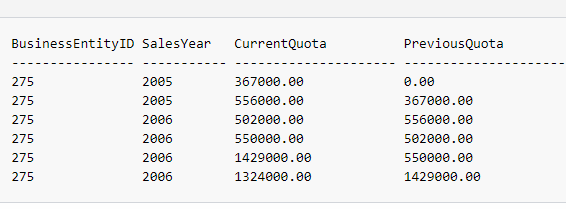
d) Lag
Used to compare values in the current row to values in a previous row
Syntax:
LAG (scalar_expression [,offset] [,default])
OVER ( [
partition_by_clause ] order_by_clause )
Example:
USE AdventureWorks2012;
SELECT BusinessEntityID, YEAR(QuotaDate) AS
SalesYear, SalesQuota AS CurrentQuota,
LAG(SalesQuota, 1,0) OVER
(ORDER BY YEAR(QuotaDate)) AS PreviousQuota
FROM
Sales.SalesPersonQuotaHistory
WHERE BusinessEntityID = 275 and
YEAR(QuotaDate) IN ('2005','2006');
Sample Result Set:
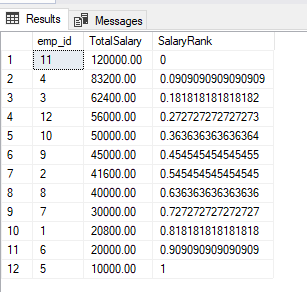
e) PERCENT_RANK()
Calculates the relative rank of a row within a group of rows
Syntax:
PERCENT_RANK( )
OVER ( [ partition_by_clause ] order_by_clause )
Example:
USE Examples;
SELECT emp_id,
CAST(COALESCE(hourly_wage * 40 * 52,
salary, commission * num_sales) AS decimal(10,2)) AS TotalSalary,
PERCENT_RANK() OVER (ORDER BY CAST(COALESCE(hourly_wage * 40 * 52,
salary, commission * num_sales)
AS Int) DESC) AS SalaryRank
FROM
wages;
Result Set:
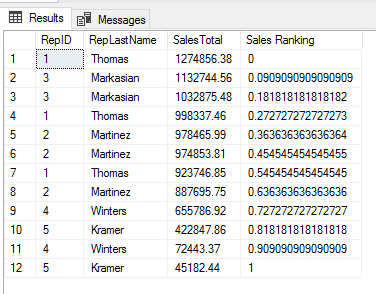
Example #2:
USE Examples;
SELECT SalesTotals.RepID, SalesReps.RepLastName,
SalesTotals.SalesTotal, PERCENT_RANK() OVER (ORDER BY SalesTotal DESC)
AS 'Sales Ranking'
FROM SalesTotals JOIN SalesReps ON
SalesTotals.RepID=SalesReps.RepID;
Result Set:
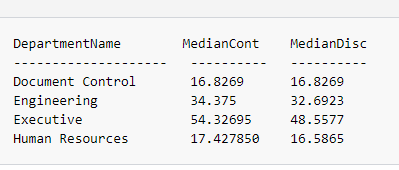
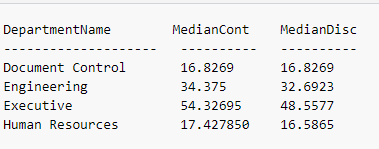
e) PERCENTILE_CONT()
Calculates a percentile based on a continuous distribution of the column
value
Syntax:
PERCENTILE_CONT ( numeric_literal )
WITHIN GROUP ( ORDER BY
order_by_expression [ ASC | DESC ] )
OVER ( [ <partition_by_clause>
] )
Example:
USE AdventureWorks2012;
SELECT DISTINCT Name AS DepartmentName ,
PERCENTILE_CONT(0.5) WITHIN GROUP (ORDER BY ph.Rate) OVER (PARTITION BY
Name) AS MedianCont,
PERCENTILE_DISC(0.5) WITHIN GROUP (ORDER BY
ph.Rate) OVER (PARTITION BY Name) AS MedianDisc
FROM
HumanResources.Department AS d
INNER JOIN
HumanResources.EmployeeDepartmentHistory AS dh
ON dh.DepartmentID =
d.DepartmentID
INNER JOIN HumanResources.EmployeePayHistory AS ph
ON ph.BusinessEntityID = dh.BusinessEntityID
WHERE dh.EndDate IS
NULL;
Result Set:
f) PERCENTILE_DISC()
Computes a specific percentile for sorted values in an entire rowset or
within distinct partitions of a rowset
Syntax:
PERCENTILE_DISC ( numeric_literal ) WITHIN GROUP ( ORDER BY
order_by_expression [ ASC | DESC ] )
OVER ( [ <partition_by_clause>
] )
Example:
USE AdventureWorks2012;
SELECT DISTINCT Name AS DepartmentName,
PERCENTILE_CONT(0.5) WITHIN GROUP (ORDER BY ph.Rate) OVER (PARTITION BY
Name) AS MedianCont,
PERCENTILE_DISC(0.5) WITHIN GROUP (ORDER BY
ph.Rate) OVER (PARTITION BY Name) AS MedianDisc
FROM
HumanResources.Department AS d
INNER JOIN
HumanResources.EmployeeDepartmentHistory AS dh
ON dh.DepartmentID =
d.DepartmentID
INNER JOIN HumanResources.EmployeePayHistory AS ph
ON ph.BusinessEntityID = dh.BusinessEntityID
WHERE dh.EndDate IS
NULL;
Result Set: