Example:
| Requirements | Points | ||
|---|---|---|---|
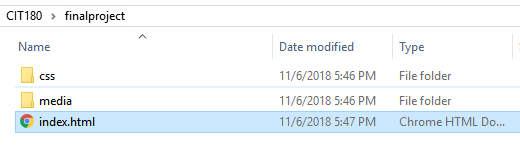
| 1. | Create a new folder named
finalproject. Inside the finalproject folder, create a media folder and a css folder. |
2 | |
| 2. | Name the final project page index.html and save it inside the
finalproject folder Example: |
1 | |
| 3. | Viewport <meta> tag in HTML | 1 | |
| 4. | <meta> tags for keywords and a description | 1 | |
| 5 | 4 images (one can be a background image) . Images should be saved to the media folder. Images must have alt text that includes keywords. Images must be responsive. | 2 | |
| 6 | Required HTML tags: <!DOCTYPE html>, <html>, <head>, <title> and <body>, in addition to <article>, <section>, <header>, <footer> and <nav>. | 10 | |
| 7 | CSS links to external style sheets: print.css and index.css (or screen.css) | 2 | |
| 8 | Responsive layout: Grid-View or CSS Grid specified in index.css (or screen.css) | 2 | |
| 9 | One <h1> and one <h2>, <h3> or <summary> tag NOTE: <summary> tags should be used with <detail> They are designed to go together | 2 | |
| 10 | Menu with at least 4 links in a <nav> element. (For styling, see #19) | 4 | |
| 11 | Page title in the <title> tags | 1 | |
| 12 | <footer> section with contact information. Copyright information is included either in the header or footer | 1 | |
| 13 | JavaScript Event Handler, JavaScript Function and/or JavaScript method | 5 | |
| 14 | Icon bar somewhere on the page | 4 | |
| 15 | box-sizing set to border-box for the
page (index.css or screen.css file) |
1 | |
| 16 | Grid-view or CSS Grid set up for mobile, tablet/laptop and desktop (index.css or screen.css file) | 2 | |
| 17 | <h1>,<h2>,<h3>,<summary> styling set for
font color, text-shadow, font-family and font-size (index.css or
screen.css file) |
2 | |
| 18 | All link states should be styled
(a:link, a:active, a:visited, a:hover) The styling from links
should be separate from the styling for the navigation menu links
(index.css or screen.css file) |
2 | |
| 19 | Navigation menu is styled as a menu
where links display as buttons OR the cursor should look like a pointer
and the links can animate when you point at them. Either design is
OK (index.css or screen.css file) |
5 | |
| 20 | Google font or custom font (index.css
or screen.css file) |
2 | |
| 21 | <body> styling for font-family and
background image or color (index.css or screen.css file) |
2 | |
| 22 | Icon bar styling (index.css or
screen.css file) |
2 | |
| 23 | CSS 3 transition or animation effect
(index.css or screen.css file) |
2 | |
| 24 | Images hidden (print.css) | 2 | |
| 25 | Text is black and 12pt (print.css) | 1 | |
| 26 | Background is white (print.css) | 1 | |
| 27 | Borders, text-shadows, box-shadows etc are removed (print.css) | 1 | |
| 28 | Margins, padding etc are set to 0 (print.css) | 1 | |
| 29 | CSS Grid or Grid-View layout should be set up for printing. All widths should be set to 100% (print.css) | 3 | |
| 30 | Links can display underlined, but the colors should be removed (print.css) | 1 | |
| 31 | All sections displayed in block style (vertical) (print.css) | 1 | |
| 32 | JavaScript should be hidden (print.css) | 1 | |
| 33 | Link to final project should be in assignment page | 2 | |
| 34 | Page should be tested live online to make sure it works (you need to go to your assignment page and click the link to make sure it displays and then, test the page) | 3 | |
| Total | 75 |