Final Project Showcase: Project Insight and Analysis
Project Insight and Analysis (25 points)
Objective: To reflect upon the process involved in
creating the final project, to explain the rationale for various design
protocols and decisions (critical thinking) and to share the project with the class.
1. Create a powerpoint slideshow and give an
overview of your project layout and design. Each bullet listed below
should go on a seperate slide within the slideshow.
-
purpose of the site 1 points
-
intended audience 1 points
-
color scheme used AND why you chose those colors
1 points
-
layout and design
used AND why you selected them (grid-view vs flexbox, horizontal vs vertical menus or
push vs overlay menus etc) 2 points
-
challenges you faced implementing
the design and how you overcame the challenges 1 points
-
what you did well 2 points
-
any areas you feel you could improve upon
2 points
2. Convert your slideshow into an mp4 video
using the following commands:
a) File menu
b) Export command
c) Create
a Video command
d Settings: Full HD, 20 seconds per slide
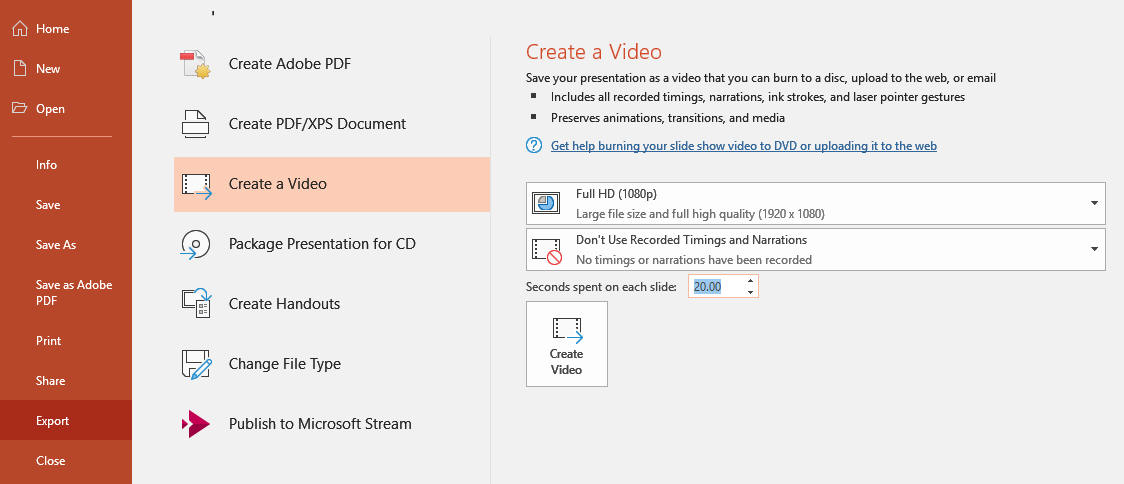
e) Click Create Video.
f) Enter a name and location for the
video file (leave the file type set to mp4)
g) You should see a video
creation progress bar display at the bottom of your slideshow
2. Share your final project with the
class in the final project discussion forum by providing a link to your
final project index.html page AND by uploading your video 7 points
a) To upload your video, click the Insert or
Edit an Audio/Video File button
b) You should see the Insert Media
window.
1. Click on the Video Tab.
2. Click Browse Repositories.
3. Click on Choose
File next to Attachment.
4. Navigate to the mp4
video file and open it (you should be back at the Moodle dialog box).
5. Next to Choose File, you should see your video file. Click Upload this
file
6. You should be back at the Insert media window.
Click the insert media button at the bottom of the window
3. Review your classmates final projects
that are posted to the discussion forum and post a reply indicating what you liked best
about each project you reviewed and any suggestions you have for possible improvements or enhancements 8 points
NOTE: To receive all the points, you must
review and reply to the projects that are posted by the due date (you do not need to review and reply to projects that are posted late)