
By the end of this assignment, you will be able to:
Create numbered lists, bulleted lists, description lists and nested lists.
Create tables, combine rows within tables and/or combine columns within tables
Apply CSS formatting to lists, tables and to data within tables.
Use the new CSS 3 styles for newspaper columns: column-count, column-gap and column-rule.
Please note that all pages created must adhere to NMC's Title IX and the student code of conduct. If you use images that are not your own, make sure they are royalty free. If you have taken information from a website, make sure you cite the information and if it is a direct quote, make sure you enclose it in double quotes.
You will be creating 2 new pages and updating your assignment page. The first page will utilize lists and tables and the second page will use newspaper columns. The pages can be on whatever topic you want.
1. Create a new page that includes the following:
a) At least one ordered list
b) At least one unordered list
c) At least one table
2. The topic can be whatever you want. If you are looking for ideas, you could use your favorite recipe and do something similar to the Lemon Cream Cheese Crumb Cake textbook exercise. You could also create a flyer, advertisement or a resume - to see an example, view: Jane Doe's Resume.
3. Minimum styling should include formatting for the body, either main, article or section, all headings, lists, and either table rows or table columns. The stylesheet can be internal or external. The minimum is the least amount you need to do. You can do additional styling as needed (it is up to you).
Example of an external style sheet displaying tags and properties (there aren't any values in the example):
body{
font-family:
font-size:
background-color:
}
article{
border:
}
h1{
color:
text-shadow:
font-family:
}
h2{
color:
text-shadow:
font-family:
}
ol,ul{
line-height:
}
td{
font-family:
font-size:
}
4. You should have an inline style in the table tag indicating the width of the table.
5. Transfer the page and css to this weeks lesson folders on the web.
6. View the page "live" and validate it.
1. Create a page using newscolumn css properties. The topic can be whatever you want. If you use an online source, make sure you cite the source. If you are using a direct quote, make sure it is in quotations and that you cite the source.
2. The css must include column-count, column-rule, column-gap and column-span. You can add any additional styling you want. The styling can be in an internal or external stylesheet.
To see an example, view: The Raven Poem
1. Add the Lesson 5 heading below textbook assignments and lab assignments. Add links to the exercises in each section (see example below)
2. Create bulleted lists by converting the paragraphs containing links that are below the lesson headings to bulleted lists. HINT: A quick way to change the <p> tags to <li> and </li> tags is to use the Edit Menu, Replace command. Type p> in the find box and li> in the replace box (that ensures that you are only targeting tags and not the text in your page). Move the cursor to the top of the page, use the down arrow to find the first occurrence and click the replace button - it will automatically go to the next occurrence
NOTE: The video from task#2 in the textbook assignment shows you how to use the find and replace feature
Example:
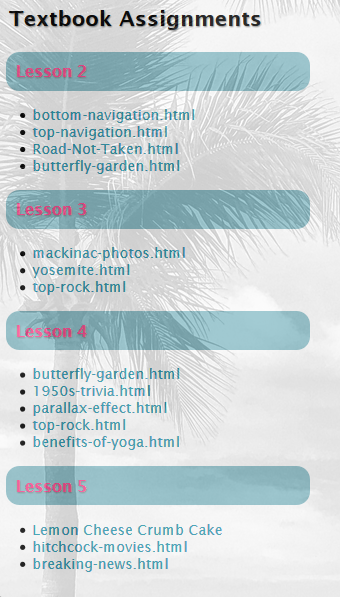
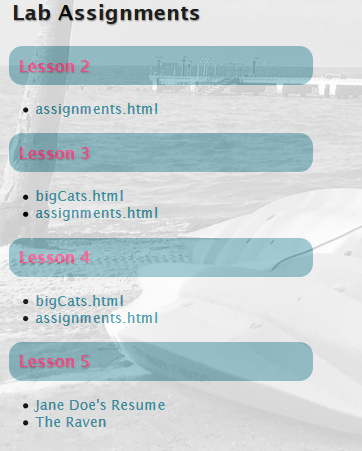
Example of what your code should look like
NOTE: The file names for your Lesson 5 Lab Assignment exercises will be unique (they will be different than the example).
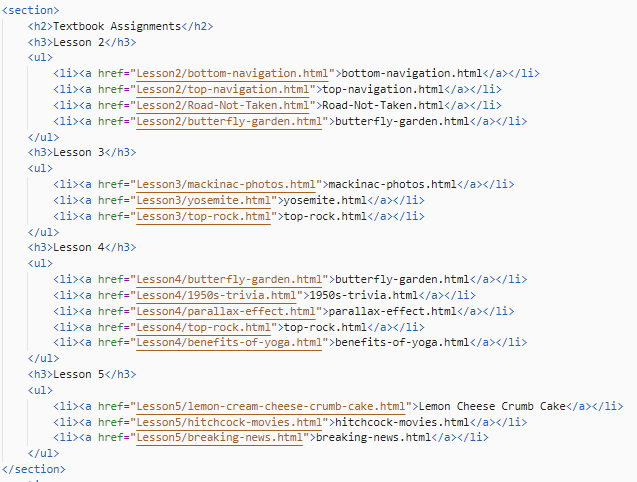
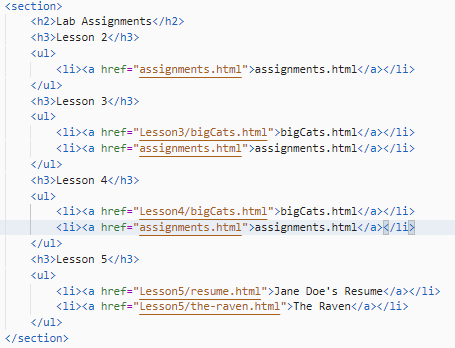
2 View your assignment page offline and test the links. If everything looks good, transfer the page to your directory on the web and make sure you test the pages "live". Transfer everything from parts 1 and 2 to the Lesson5 folder.
|
Created a page utilizing lists and tables that included: a) At least one ordered list ................................................3 points b) At least one unordered list.............................................3 points c) At least one table..............................................................3 points d) Added CSS styling for the following...........................3 points body{ |
12 points |
| Created a page using the newscolumn format. The CSS must include column-count, column-rule, column-gap and column-span | 8 points |
| Applied bullets to lesson links in the assigment.html page | 3 points |
| Updated the assignment.html page for links to the lesson 5 textbook and lab exercises | 2 points |
| Total | 25 points |