Chapter 4 covers looping through lists, creating sequential, numeric lists, tuples and how to style your code.
The lecture informaton is in one video. To see an explanation of all lecture material in chapter 4, watch: https://youtu.be/7SNO6P56BC4
To see sample exercises that go with the Try It Yourself sections in the chapter, download: chapter_04.zip
Python includes 2 types of loops: For loops and While loops.
The commands are a little different than traditional programming languages. We will discuss both types today, but we won't use While loops until next week.
Used to execute commands while a condition tests true.
Syntax using numbers for the loop:
variableToTest = value
while variableToTest < value:
statement 1
statement 2
statement n
variableToTest is incremented
Example using a numeric counter:
counter=1
while counter < 10:
print(counter)
counter +=1
While loops are often used with user input where the user enters the value to end the loop. We will cover this type of while loop in chapter 7 and we will also discuss how else is used in Python while loops.
For loops are used to repeat commands for items in a sequence such as a list, tuple, dictionary, set or string.
Python for loops function like foreach loops found in other languages because they automatically iterate over each item in the list.
Syntax:
for item in listName:
statement 1
statement 2
statement n
statement to execute after the for loop
Where item represents the item in the list.
Things to NOTE:
1. the for statement ends with a colon
2. each command you want executed in the for loop is indented directly below the for statement
3. if you want to access the item being processed, you need to use item or whatever variable name you have entered after the keyword for
Example #1:
zooAnimals = ["Tiger", "Lion", "Rhino", "Polar Bear", "Snow Monkey", "Giraffe", "Zebra", "Antelope", "Alligator"]
for animal in zooAnimals:
print(animal)
Sample Output:
Tiger
Lion
Rhino
Polar Bear
Snow Monkey
Giraffe
Zebra
Antelope
Alligator
Example #2:
zooAnimals = ["Tiger", "Lion", "Rhino", "Polar Bear", "Snow Monkey", "Giraffe", "Zebra", "Antelope", "Alligator"]
counter=1
print("----------------------------------------------------------------")
for animal in zooAnimals:
print(counter, f" {animal.title()}")
counter+=1
print("----------------------------------------------------------------")
Sample Output:
----------------------------------------------------------------
1  Tiger
2  Lion
3  Rhino
4  Polar Bear
5  Snow Monkey
6  Giraffe
7  Zebra
8  Antelope
9  Alligator
----------------------------------------------------------------
A few things to note about example 2:
Python has standards that are used when coding programs. Any changes to standards must be done using a PEP (Python Enhancement Proposal). Three standards you should be aware of involve indentation, line length and blank lines.
In Python, when you are grouping lines of code, you need to indent them. That means you need to be very precise in your coding. If you indent extra lines of code OR you forget to indent lines within a group, you will get errors or unexpected results.
zooAnimals = ["Tiger", "Lion", "Rhino", "Polar Bear", "Snow Monkey", "Giraffe", "Zebra", "Antelope", "Alligator"]
for animal in zooAnimals:
print(animal)
zooAnimals = ["Tiger", "Lion", "Rhino", "Polar Bear", "Snow Monkey", "Giraffe", "Zebra", "Antelope", "Alligator"]
counter=1
print("----------------------------------------------------------------")
for animal in zooAnimals:
print(counter, f" {animal.title()}")
counter+=1
print("----------------------------------------------------------------")
You can avoid unexpected indentation errors by indenting only when you have a specific reason to do so. In the programs you’re writing at this point, the only lines you should indent are the actions you want to repeat for each item in a for loop.
Initially, developers wanted a maximum of 80 characters per line. This has become a standard, but there are teams that deviate from that standard for different reasons. When possible, you should try to adhere to the 80 character rule. NOTE: You will not get a syntax error if you go over 80 characters, it is just standard practice.
A general styling recommendation for blank lines is to use them to group sections of code that go together. As you create longer programs, you will have lines of code that perform a specific task, followed by lines of code that perform a different task. In between, you can insert a blank line to visually separate the operations in the program.
To see a video demonstration, watch: https://youtu.be/Q09jmytmJvI
1. Open the CIT228 folder and create a new folder named Chapter4
2. Copy myFavorites.py from your Chapter3 to your Chapter4 folder
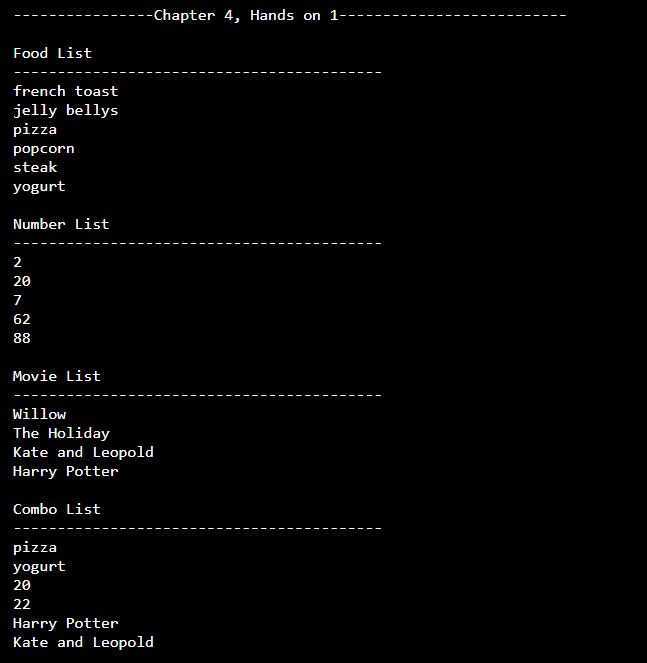
3. You should have four separate lists (favorite foods, favorite numbers, favorite movies and a combination list). At the bottom of the program, add for loops to print out all items in each of your lists (you will need 4 for loops, one for each list)
Your new output for this hands on will display below the output from chapter 3 and should look similar to the example below:
4. Complete exercise 4-1 OR 4-2 on page 56. You can name the file whatever you want, but make sure you save it in the Chapter4 folder.
Sample Output from exercise 4-2
Rabbit
Kangaroo
Klipspringer
*******Animals that Hop*******
Rabbit are found all over the world.
Kangaroo are native to Austrailia.
Klipspringer are found in South Africa.
Python includes many functions. We will be looking at a few of the functions that deal with numbers today.
The function is designed to generate a range of numbers. It can be used in for loops or in list statements.
Syntax: range(beginning#, ending#, step)
beginning# is optional and is the starting number in the sequence (if you omit the beginning#, Python assumes 0)
ending# is required and is the ending number in the sequence IMPORTANT: This number will be 1 less than the number you enter. If you enter the number 20 for the ending number, it will stop at 19. You must enter 21 to have the number 20 as the ending number
step is optional and is the interval for incrementing the numbers. To generate odd numbers, you would start with 1 and set the step to 2. To generate even numbers, you would start with 2 and set the step to 2 etc.
Example using range in a list statement to generate 50 numbers:
numbers = list(range(1, 51))
print(numbers)
Sample Output:
[1, 2, 3, 4, 5, 6, 7, 8, 9, 10, 11, 12, 13, 14, 15, 16, 17, 18, 19, 20, 21, 22, 23, 24, 25, 26, 27, 28, 29, 30, 31, 32, 33, 34, 35, 36, 37, 38, 39, 40, 41, 42, 43, 44, 45, 46, 47, 48, 49, 50]
Example using range in a for loop to print numbers 1 through 10 - NOTE that the ending number is 11
for number in range(1,11):
print(number)
Sample Output:
1
2
3
4
5
6
7
8
9
10
Example using step to generate even numbers beginning with 2 and ending with 50
numbers = list(range(2, 51, 2))
print(numbers)
Sample Output:
[2, 4, 6, 8, 10, 12, 14, 16, 18, 20, 22, 24, 26, 28, 30, 32, 34, 36, 38, 40, 42, 44, 46, 48, 50]
Python includes Min, Max and Sum which is pretty standard statistical functions in programs that deal with data analysis. The syntax is similar for the stat functions.
Syntax: functionName(listName)
Example:
numbers = list(range(2, 51, 2))
print("The largest number is: ", max(numbers))
print("The smallest number is: ", min(numbers))
print("The total of all the numbers is: ", sum(numbers))
print("The average number is: ", sum(numbers)/len(numbers))
Sample Output:
The largest number is:  50
The smallest number is:  2
The total of all the numbers is:  650
The average number is:  26.0
This is a more advanced feature of Python that offers a shorter syntax when you want to create a new list based on values in an existing list
newList = [value for value in oldList]
or
newList = [value for value in range(9,99)]
Original example from the book:
squares = []
for value in range(1, 11):
square = value ** 2
squares.append(square)
print(squares)
The program takes each value in the range,square it and then adds it to the squares list.
This same processing can be done using list comprehension using 2 lines of code.
squares = [value**2 for value in range(1, 11)]
print(squares)
Example #2 without using list comprehension:
courses = ["CIT228", "CIT195", "ENG110", "MTH120", "BUS255"]
copied_courses = []
for course in courses:
copied_courses.append(course)
print(copied_courses)
Example #2 with list comprehension:
courses = ["CIT228", "CIT195", "ENG110", "MTH120", "BUS255"]
copied_courses = [c for c in courses]
print(copied_courses)
newList = [value for value in oldList if condition == True]
Example without list comprehension:
courses = ["CIT228", "CIT195", "ENG110", "MTH120", "BUS255"]
CIT_courses = []
for course in courses:
if "CIT" in course:
CIT_courses.append(course)
print(CIT_courses)
Example wIth list comprehension:
courses = ["CIT228", "CIT195", "ENG110", "MTH120", "BUS255"]
CIT_courses = [c for c in courses if "CIT" in c]
print(CIT_courses)
The output for both examples is the same:
['CIT228', 'CIT195']
To see a video demonstration, watch: https://youtu.be/xyPvzXDIta4
1. Create a new program and name it stats.py
a. Retrieve a random number between 10 and 100 ( HINT: Remember to import random. You can use number = random.randrange(10,100) to retrieve the number)
b. Generate a list a numbers using the random number you retrieved and print the list (you can omit the start# and the step#)
c. Use the max, min and sum functions on the list you generated and print the results
d. Calculate the average number in your list by taking the sum divided by the length ( sum(list)/len(list) ) and print the results
Your output should resemble the example below:
[0, 1, 2, 3, 4, 5, 6, 7, 8, 9, 10, 11, 12, 13, 14, 15, 16, 17, 18, 19, 20, 21, 22,
23, 24, 25, 26, 27, 28, 29, 30, 31, 32, 33, 34, 35, 36, 37, 38, 39, 40, 41, 42, 43,
44, 45, 46, 47, 48, 49, 50, 51, 52, 53, 54, 55, 56, 57, 58, 59, 60, 61, 62, 63, 64, 65]
The largest number =  65
The smallest number =  0
The total of all the numbers =  2145
The average number =  32.5
2. Complete Try It Yourself exercise 4-8 on page 60. Name the file cube.py
3. Add the code for exercise 4-9 below the code you created for exercise 4-8.
Your output should look like the example below:
[1, 8, 27, 64, 125, 216, 343, 512, 729, 1000]
[1, 8, 27, 64, 125, 216, 343, 512, 729, 1000]
4. Save your changes
Python includes commands that let you access a range within a list and copy list.
Slicing can be used with any command that indexes a list. It allows you to select a range within the list.
In place of a subscript number, you insert a subscript range.
Syntax: list[start:stop]
If you omit the starting number and code :stop, it wiill begin with 0
The number you stop at is the number -1
Subscripting begins at 0
Example #1 - Slicing in a print statement:
courses = ["CIT228", "CIT195", "ENG110", "MTH120", "BUS255"]
print(courses[2:4])
Sample Output:
['ENG110', 'MTH120']NOTE: ENG110 is at subscript 2 and MTH120 is at 4-1 which is subscript 3. That is the entire range.
Example #2 - Slicing in a print statement:
courses = ["CIT228", "CIT195", "ENG110", "MTH120", "BUS255"]
print(courses[:5])
Sample Output
['CIT228', 'CIT195', 'ENG110', 'MTH120', 'BUS255']NOTE: The start# was omitted, so it begins at 0. The ending subscript is 5-1 which is 4, so it retrieved subscripts 0,1,2,3 and 4
Example #3- Slicing in a For Loop:
courses = ["CIT228", "CIT195", "ENG110", "MTH120", "BUS255"]
for c in courses[:2]:
print(c)
Sample Output:
CIT228
CIT195
NOTE: The start# was omitted, so it will start subscripting at 0 and it will stop at 2-1 which is subscript 1.
You can use the slice operator (:) to copy. This technique keeps both lists separate, so you can modify the new list without affecting the original. You can also modify the original without impacting the new list.
To copy and create 2 completely separate lists, you need to use the slice operator and omit the starting and ending subscript numbers AND use it in an assignment statement.
Syntax: newList = oldList[:]
Example:
myCourses = ["CIT228", "CIT195", "MTH120"]
yourCourses = myCourses[:]
yourCourses.append("ART150")
yourCourses.append("BUS255")
myCourses.append("CIT190")
myCourses.append("PSY101")
yourCourses.sort()
myCourses.sort()
print("Your courses are: ", yourCourses)
print("My courses are: ", myCourses)
Sample Output:
Your courses are:  ['ART150', 'BUS255', 'CIT195', 'CIT228', 'MTH120']
My courses are:  ['CIT190', 'CIT195', 'CIT228', 'MTH120', 'PSY101']
WARNING: If you do an assignment statement and assignment one list to another, Python does not keep them separate. The lists share the same memory location, so anything you do to the original list also impacts your new list.
Example- when you omit the [:], the lists share the same memory address and are NOT separate:
myCourses = ["CIT228", "CIT195", "MTH120"]
yourCourses = myCourses
yourCourses.append("ART150")
yourCourses.append("BUS255")
myCourses.append("CIT190")
myCourses.append("PSY101")
yourCourses.sort()
myCourses.sort()
print("Your courses are: ", yourCourses)
print("My courses are: ", myCourses)
Sample Output:
Your courses are:  ['ART150', 'BUS255', 'CIT190', 'CIT195', 'CIT228', 'MTH120', 'PSY101']
My courses are:  ['ART150', 'BUS255', 'CIT190', 'CIT195', 'CIT228', 'MTH120', 'PSY101']
Whether you use the slice operator or not depends upon whether or not the lists need to be separate.
To see a video demonstration, watch: https://youtu.be/F2iu2ITlbnA
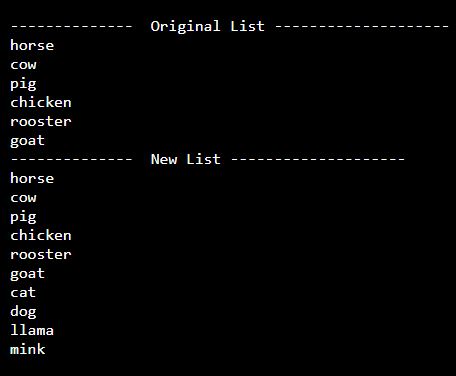
1. Create a new program called farmAnimals.py
2. Add 6 farm animals to a list.
3. Copy the list using the slice operator and add 4 more animals to the new list using the append command.
4. Use a for loop to print each list.
Example:
5. Save your changes.
6. Complete exercise 4-10 on page 65 using your farmAnimals.py program and your second (longer) list.
Sample Output:

7. Save your changes.
A tuple is similar to a list, but you cannot change the data (the data is immutable). An immutable list is a tuple.
Creating a tuple is similar to a list, the difference is you use parenthesis instead of brackets AND if you only have 1 item in your tuple, you still need to include a comma (the comma after the item identifies it as a tuple)
Syntax: tupleList = (value1, value2, valuen)
NOTE: Both examples below will create a tuple; however, using parenthesis is considered best practice:
shifts=12,
hoursInShifts=(12,)
Typically, you will have more than 1 value in a Tuple.
Example:
loanPeriods = (5,10,15,20)
for periods in loanPeriods:
print("The number of years in a loan can be ", periods)
Sample Output:
The number of years in a loan can be  5
The number of years in a loan can be  10
The number of years in a loan can be  15
The number of years in a loan can be  20
If you try to change a value in a Tuple, you will get an error
Example:
loanPeriods = (5,10,15,20)
loanPeriods[0]=1
for periods in loanPeriods:
print("The number of years in a loan can be ", periods)
Sample Output - the following error will display if you try to change a Tuple:
Traceback (most recent call last):
     File "./prog.py", line 2, in <module>
TypeError: 'tuple' object does not support item assignment
Because Python is loosely typed, it will let you assign new values to a variable storing a Tuple, it just doesn't let you subscript into a Tuple and change values.
Example:
loanPeriods = (5,10,15,20)
for periods in loanPeriods:
print("The number of years in a loan can be ", periods)
loanPeriods = (1,8,16,25)
for periods in loanPeriods:
print("The number of years in a 2021 loan can be ", periods)
Sample Output
The number of years in a loan can be  5
The number of years in a loan can be  10
The number of years in a loan can be  15
The number of years in a loan can be  20
The number of years in a 2021 loan can be  1
The number of years in a 2021 loan can be  8
The number of years in a 2021 loan can be  16
The number of years in a 2021 loan can be  25
To see a video demonstration, watch: https://youtu.be/MqDq_axfUI0
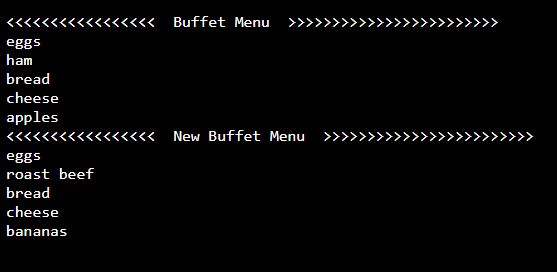
1. Complete Try It Yourself 4-13 on page 68. Name the file menu.py NOTE: After you try modifying one item, you will get an error. Comment out the code you used to modify the item and continue working on the exercise.
Sample Output:
To see a video demonstration, watch: https://youtu.be/Y-aJ0F908PU
1. You should have the following files in your Chapter4 folder:
2. Upload Chapter4 to GitHub
a. Click the ... next to CIT228 Git and select the Changes menu, Stage all Changes command.
b. In the Message window below Source Control, enter Chapter4 and then click the ... next to CIT228 Git and select the Commit menu, Commit Staged command
c. Display the menu next to the CIT228 Git folder by selecting ... and select the Push command
d. This will put all files and folders inside your CIT228/Chapter4 directory into your GitHub repository
3. Open a web browser and go to your CIT228 repository. Make sure the Chapter4 directory and files are there, then copy the URL and paste it into the lab assignment dropbox (you are done with the second part of your lab assignment!)