Chapter 5 covers using if statements, conditional operators and logical operators. We will also cover some useful methods you can utilize in if statements.
To see an explanation of all lecture material in chapter 5, watch: https://youtu.be/8po877QQs7w
To see sample exercises that go with the Try It Yourself sections in the chapter, download: chapter_05.zip
If statements are written with the keyword if followed by a condition that is being checked. The condition will test either true or false.
Python supports the following conditional operators:
Python relies on indentation to tell it what to execute when the condition tests true
Syntax for single-sided if (it's only concerned with actions when it tests true):
if condition:
statement1
statement2
statementn
Example:
hours=50
payrate=20
if hours > 40:
overtime=(hours-40) * payrate
print("Your overtime pay is: ", overtime)
Sample Output:
Your overtime pay is: 200
Syntax for double-sided if (it is concerned with what to do when true or false):
if condition:
statement1
statement2
statementn
else:
statement1
statement2
statementn
IMPORTANT things to remember:
Example of an if/else statement:
hours=50
payrate=20
print("Your regular pay is: ", 40 * payrate)
if hours > 40:
overtime=(hours-40) * payrate
print("Your overtime pay is: ", overtime)
else:
print("You don't have any overtime this week")
Sample Output:
Your regular pay is:  800
Your overtime pay is:  200
Example from the book:
cars = ['audi', 'bmw', 'subaru', 'toyota']
for car in cars:
if car == 'bmw':
print(car.upper())
else:
print(car.title())
Sample Output:
Audi
BMW
Subaru
Toyota
Things to remember about conditional operators:
Logical operators let you create more complicated conditions by allowing more than 1 value to be checked. Keywords you can use are AND or OR
With AND, all conditions must test true
Example:
hours=50
payrate=20
department=1
print("Your regular pay is: ", 40 * payrate)
if hours > 40 and department==10:
overtime=(hours-40) * payrate
print("Your overtime pay is: ", overtime)
else:
print("You don't have any overtime this week")
Sample Output:
Your regular pay is:  800
You don't have any overtime this week
With OR, only one condition must test true
Example:
hours=50
payrate=20
department=1
print("Your regular pay is: ", 40 * payrate)
if hours > 40 or department==10:
overtime=(hours-40) * payrate
print("Your overtime pay is: ", overtime)
else:
print("You don't have any overtime this week")
Sample Output:
Your regular pay is:  800
Your overtime pay is:  200
To check for a value inside a list, you can use the keyword "in".
Example:
invoicesProcessed = list(range(1,2000))
if 1950 in invoicesProcessed:
print("Your invoice was processed today")
else:
print("Your invoice has not been processed yet")
Sample Output:
Your invoice was processed today
To see if a value is missing, you can use "not in"
Example:
zooAnimals = ["Tiger", "Lion", "Rhino", "Polar Bear", "Snow Monkey"]
if "arctic fox" not in zooAnimals:
zooAnimals.append("arctic fox")
print(zooAnimals)
Sample Output:
['Tiger', 'Lion', 'Rhino', 'Polar Bear', 'Snow Monkey', 'arctic fox']
To check to see if a list or variable contains a value, you just need the if keyword followed by the list or variable
Example:
zooAnimals=[]
if zooAnimals:
print("They exist")
else:
zooAnimals.append("Elephant")
zooAnimals.append("Giraffe")
print("Zoo Animals has been created")
print(zooAnimals)
Sample Output:
Zoo Animals has been created
['Elephant', 'Giraffe']
A boolean expression is a condition that tests true or false.
When we use if statements, the conditions we check are boolean expressions.
Many programming languages allow us to assign variables the values true or false. Python also allows this type of assignment.
Example:
keep_playing=True
or
extra_lives=False
IMPORTANT: For Python to recognize the value as boolean, you need to use a capital letter when assigning True or False. If you type in lowercase, it will assume a text string instead of a boolean.
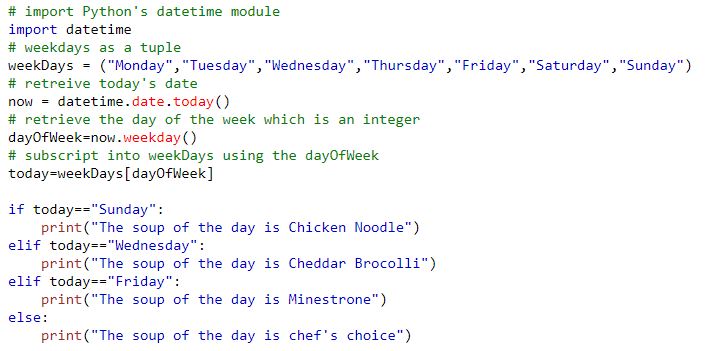
Elif statements are used when you want to test a condition if it is true and a different condition if it is false. Elif combines "else if" into one word and is unique to Python. You can have one elif block or multiple elif blocks. It should be used when you only need 1 condition to pass for actions to be executed. If you need to test several conditions, you should just use several if statements instead of an elif statement.
Syntax:
if condition:
statement1
statement2
statementn
elif condition:
statement1
statement2
statementn
else:
statement1
statement2
statementn
Where if and elif are required blocks. The else block is optional
Example with 2 elif blocks:
Sample output:
The soup of the day is chef's choice
To see a video demonstration, watch: https://youtu.be/pqf7obMKNNU
1. Open the CIT228 folder and create a new folder named Chapter5
2. Create a new file and call it conditional_tests.py (save the file into your Chapter5 folder)
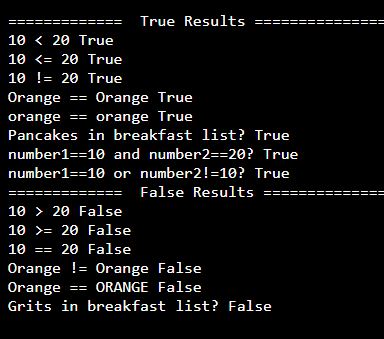
3. Using the conditional_tests.py file, complete Try It Yourself 5-1 and then modify the program for Try It Yourself 5-2 (page 78)
Sample Output:
4. Save all your changes.
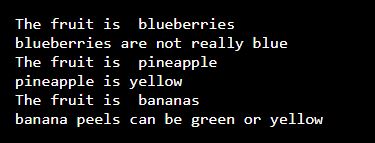
5. Create a new file called fav_fruits.py and complete Try It Yourself 5-7 on page 85
Sample Output
In programming, we typically combine if statements and loops to produce results we desire.
You can nest an if statement inside a loop OR you can put a loop inside an if block
Example of a for loop inside an if/else:

Sample Output:
The weekday specials include:
Spaghetti
Lasagne
Mac & Cheese
Meatloaf
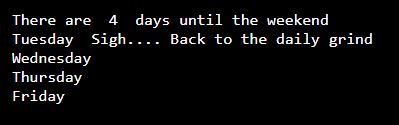
Example of an elif block inside a for loop (the example also uses a boolean variable to determine if a quote has been printed or not):

Sample Output:
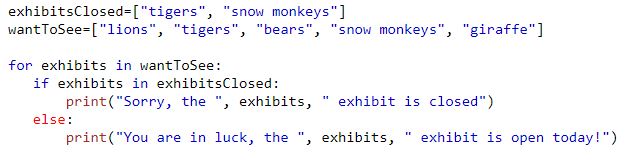
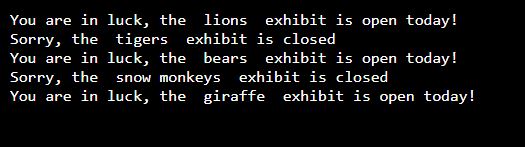
Example using a list to search within another list:
Sample Output:
To see a video demonstration, watch: https://youtu.be/o05RpUkv-A0
1. Create the weekend.py program shown below and save it into your Chapter5 folder (make up your own quotes for the different days of the week)
2. Create a new program called hello_admin.py and save it into your Chapter5 folder
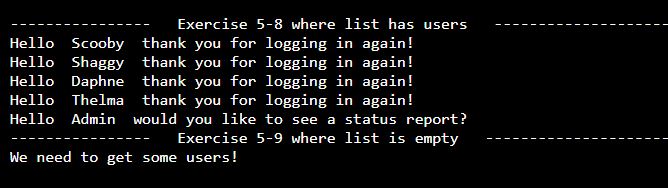
3. Complete Try It Yourself 5-8 and 5-9. Save your changes.
Sample Output
4. Complete Try It Yourself 5-10 on page . Name the program whatever you want
HINT: To create the current_users in lowercase, I used the following code:
Sample Output
Pebbles  is available.
Wilma  is available.
Betty  is available.
Freddy  has been taken, please use something else.
Barney  is available.
To see a video demonstration, watch: https://youtu.be/GbDBH3ix8fc
1. You should have the following files in your Chapter5 folder:
2. Upload Chapter5 to GitHub
a. Click the ... next to CIT228 Git and select the Changes menu, Stage all Changes command.
b. In the Message window below Source Control, enter Chapter5 and then click the ... next to CIT228 Git and select the Commit menu, Commit Staged command
c. Display the menu next to the CIT228 Git folder by selecting ... and select the Push command
d. This will put all files and folders inside your CIT228/Chapter5 directory into your GitHub repository
3. Open a web browser and go to your CIT228 repository. Make sure the Chapter5 directory and files are there, then copy the URL and paste it into the lab assignment dropbox (you are done with the second part of your lab assignment!)