The chapter covers why normalization is important in database design AND how to normalize tables. If you don’t design your database correctly, you will have many problems working with it. Design is the most important step in database creation.
By the end of this unit, you will be able to:
The textbook assignment provides hands-on practice for concepts covered below and includes video demonstrations for all required tasks.
A relational database is made up of several components. The table is the most important because that is where all the data in a database is stored, and without tables, there would not be much use for relational databases.
As you know, a database consists of one or more tables. Each table is made up of rows and columns. If you think of a table as a grid, the columns are laid out from left to right across the grid and each entry of data is listed in rows.
Each row in a table is uniquely identified by a primary key. Keys can be comprised of one or more columns, as long as they are unique identifiers. Keys can also be manufactured (i.e. identity columns). The purpose of a key is to retrieve a single record (or row)
Columns are designed to hold a specific type of data (numbers, text, dates etc.) A column is defined by its name (which must be unique within a table) and data type. The name is used in SQL statements when selecting and ordering data, and the data type is used to validate information stored.
Tables can be connected (joined) based on primary key/foreign key relationships OR common fields.
Joined tables can share information (you can retrieve data from either table).
Database normalization is process used to organize a database into tables and columns. Tables are organized around objects or entities which are single topics.
Each column identifies a feature of the object. The features are called attributes.
Each row creates a record which is called an instance of the entity
The formal process for diagramming database models is called entity-relationship (ER) modeling.
Before you can create an ER diagram, you need to complete 6 design steps. The six steps for designing a data structure are:
1. Identify the data elements
2. Subdivide each element into its
smallest useful component
3. Identify the tables and assign columns
4. Identify the primary and foreign keys
5. Review whether the data
structure is normalized
6. Identify the indices (indexes)
We will take a closer look at each step in the process.
1. Identify the data elements (this is typically done by looking at paperwork , spreadsheets or an existing database).
2. Break down elements to their simplest components
Example:
Address information can be broken down into:
• Street
• City
• State
• Zipcode
Name information can be broken down into:
• First Name
• Middle Name
• Last Name
3, 4 and 5. Identify the tables and assign columns, determining primary and foreign keys and normalization
This takes some skill, practice and time. You basically look at your data and organize it into logical groupings. While you are organizing the data, you will see columns that are unique identifiers (primary keys) and you will see instances where you know tables must share data, so you can also identify foreign keys while you are creating the tables. The process of fine tuning your table design involves normalizing the tables. So steps 3,4 and 5 of the design process are often done at the same time (this is not a sequential process).
Methods of gathering data include:
• Reviewing paperwork (this can help you with
this task because forms are already in logical groupings).
•
Reviewing other data sources like spreadsheets and existing database
files.
• Interviewing employees who work with the data
• Job
shadowing employees who work with the data to determine if improvements
in process and procedure can be obtained.
Once the data has been gathered, you will need to analyze it to determine what the purpose of the information is, how the information should be stored and how it should be organized.
For example, a spreadsheet containing information about sales people and customers serves several purposes:
• Identify sales people in your organization
• List all customers
your company calls upon to sell product
• Identify which sales people
call on specific customers.
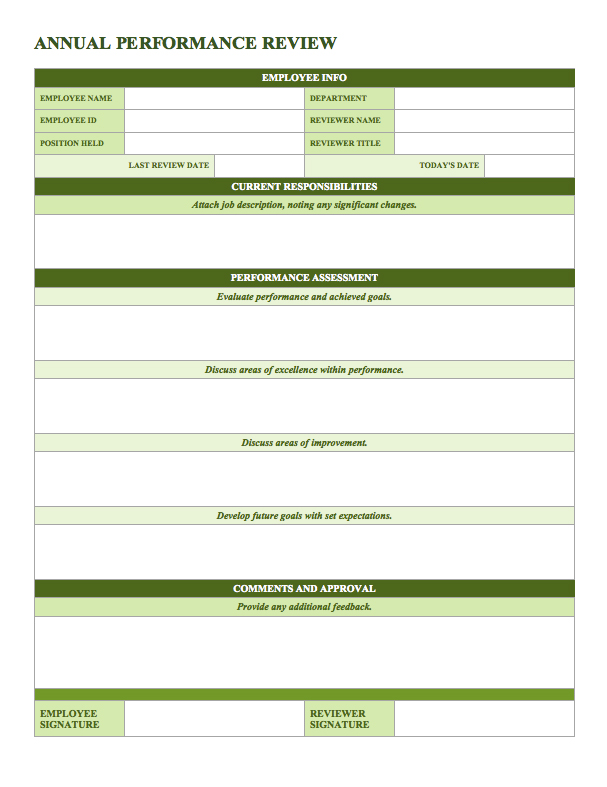
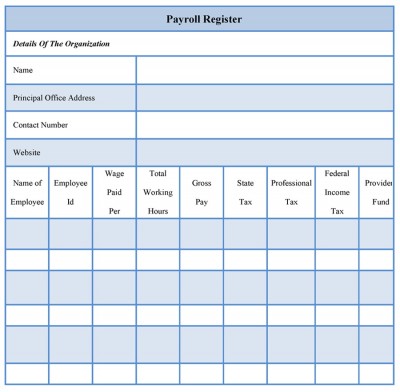
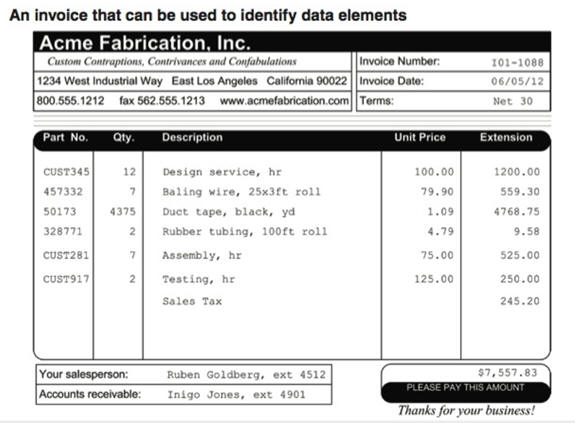
Forms contain a great deal of information which can typically be split into multiple tables. The example below is from the textbook:
The following links provide additional examples of forms:
• performance-form.jpg
•
payroll-form.jpg
•
Sponsorship Form for website.jpg
•
invoice.png
The main idea is that a table should be about a specific topic and that only those columns which support that topic are included.
By limiting a table to one purpose you reduce the number of duplicate data that is contained within your database and that makes modifying the database much easier (duplicate data is a problem when modifying data and the structure of database tables)
Keeping the main purpose in mind, normalization is a technique you can use to achieve a table based on a single object (or entity) and columns (attributes) that only support that single object.
There are three normal forms almost all databases follow; however, there are more than three normal forms (we will be covering all the normal forms so you know what they are and how to implement them).
There several reasons to normalize a database.
1. Minimize duplicate data
2. Minimize problems maintaining accurate data
3. Simplify queries.
4. More efficient data creation, retrieval, update and deletion
5. Faster data retrieval and updates
As we go through the various states of normalization we’ll discuss how each form addresses these issues, but to start, let’s look at some data which hasn’t been normalized and discuss some potential pitfalls. Once these are understood, i think you’ll better appreciate the reason to normalize the data.
The normalization process can be used on existing database tables and brand-new database tables. We will work through a few examples using existing tables and then new tables. The table shown below is for sales staff. The primary key is EmployeeID

The first question to ask is what is the purpose of the table? Does it serve 1 purpose or many?
Just looking at the data, you can see that it is identifying salespeople, customers and sales office information. So, it is serving 3 purposes. Because a table should serve 1 purpose, this table needs to be restructured.
The current table has a lot of duplicate information – this creates problems updating values and it also wastes storage space which can impact database performance.
What happens if we move the Chicago Office to a different city?
What happens if a rep quits or is reassigned?
Trying to accurately maintain this table would be a nightmare. These types of problems are referred to as modification anomalies.
The existing table presents 3 anomalies: Insertion, Update and Deletion.
Insertion Anomaly
How do we handle adding a new sales office or new customer?
Update Anomaly
How do we handle changing the office phone number?
How do we ensure all numbers are modified?
Deletion Anomaly
How do we handle deleting a salesrep without deleting the customer?
The table would also present problems selecting and sorting information(especially if you wanted customer information)
Example:
SELECT salesoffice
FROM salesstaff
WHERE customer1 = ‘ford’ or
customer2 = ‘ford’ or customer3 = ‘ford’
How can normalization help?
There are three common forms of normalization that all database tables follow: 1st , 2nd , and 3rd normal form. The forms build upon each other, so tables that are in 3rd normal form are also in 1st and 2nd normal form.
Just applying the first 3 normal forms will fix the problems in the table.
1. First Normal Form (1NF)
A table is in 1NF if it conforms to the following:
a. Each field (i.e. column) value must be a
single value only.
b. All values for a given field (column ) must be
of the same type.
c. Each field name (column label) must be unique.
d. The order of fields (columns) is insignificant
e. No two records
(rows) in a relation can be identical.
f. The order of the records
(rows) is insignificant.
g. If you have a key defined for the
relation, then you can meet the unique row requirement.
In the example, customer1,customer2, customer3 are columns with repeating values (the data in the rows isn’t being analyzed, it is the columns themselves).
To force the example into 1NF requires splitting it into multiple tables:
• Customer table
• SalesRep table
• Sales Office table
Another example showing how to go from a non-1NF to a 1NF database (Note how there are 3 columns containing multiple values):
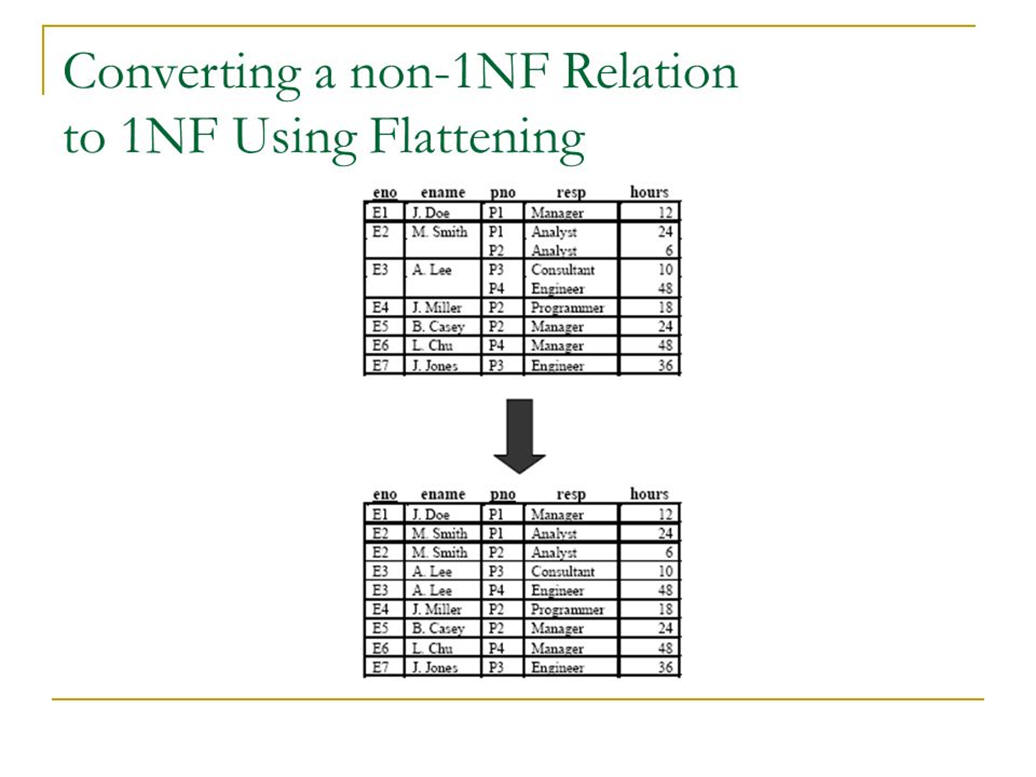
The revised table eliminates the mulitple value problem, but highlights a different problem when testing for second normal form.
2. Second Normal Form (2NF)
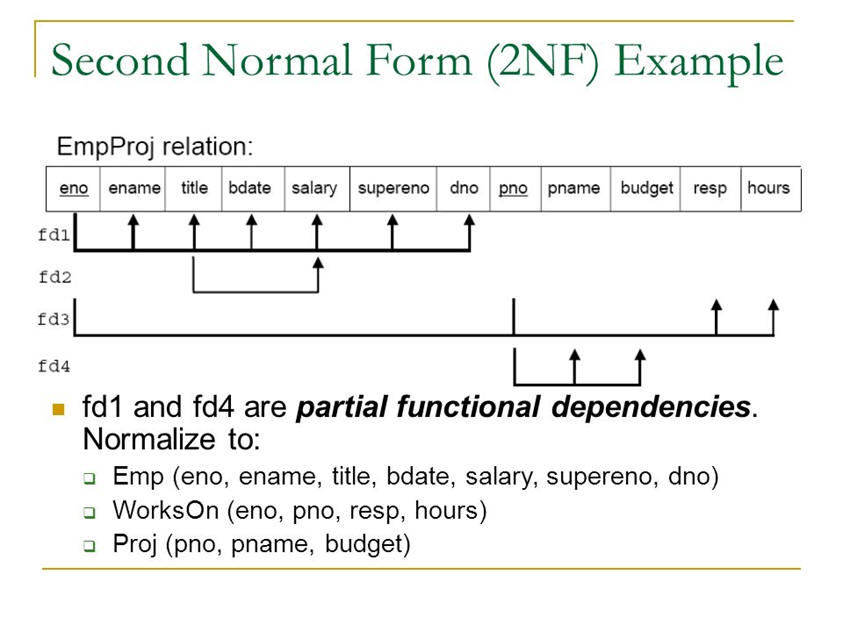
A table is in second normal form (2NF) if all of its non-key fields are dependent on all of the key.
Tables that have a single field for a key are automatically in 2NF assuming that all non-key fields are dependent upon the key.
It is a little trickier with composite keys (keys that are made up from multiple fields). If the key is comprised of 2 or more fields, all the non-key fields must be dependent upon ALL of the key fields. If the non-key fields are not dependent on ALL the fields that make up the key, you have a partial-dependency and that is not allowed in 2NF.
To resolve issues, non-key fields(columns) are removed and placed into a different table.
Here’s an expanded example of the employee/project table that illustrates how to go from 1NF to 2NF (the table must be split apart because of partial dependencies) For the table to be in 2NF, everything in the table must depend upon the primary key
3. Third Normal Form (3NF) & Boyce-Codd (BCNF)
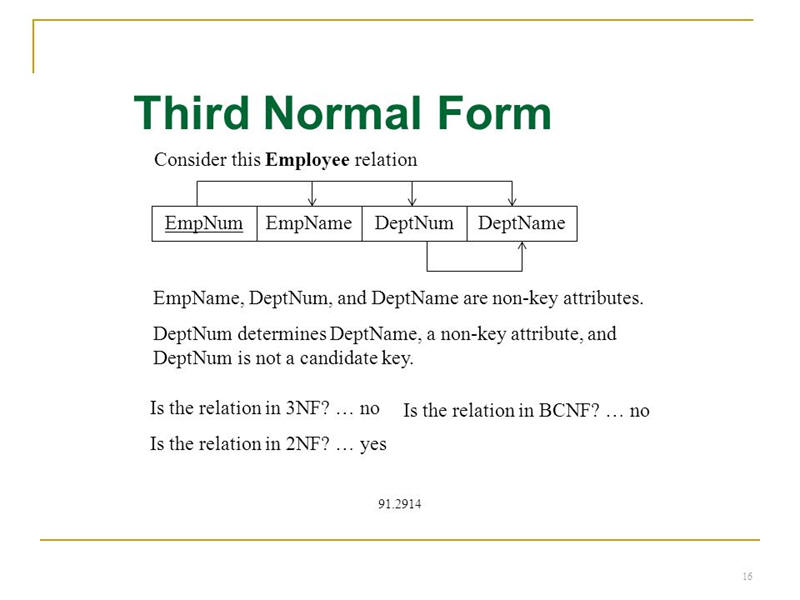
A table is in third normal form if it is in 2NF AND every non-key column depends only on the primary key. To make this happen, you must remove transitive dependencies (Boyce-Codd normal form). A transitive dependency occurs when the value in one field is dependent upon the value in another field, for example, the value in a city and state field are dependent upon the zipcode - technically, if you include city, state and zipcode in a single table, you have a transitive dependency.
To conform to 3NF/BCNF, you can:
• Eliminate fields that do not depend on the key.
• Create a new
table for groups of fields that may apply to more than a single record
in the table (like city, state and zipcode)
If we apply the rules from the first 3 normal forms to the table, we would have something that looks like this:
• SalesRep table containing:
o repID (PK)
o FirstName
o LastName
o
SalesOffice#(FK)
• Sales office table containing:
o SalesOffice#(PK)
o Location City
o
Location State
o Phone#
• Customer table containing
o CustomerID(PK)
o Company Name
o Contact
FirstName
o Contact LastName
o Contact phone
o repID(FK)
Does the structure above eliminate problems discussed earlier?
Can we remove a rep without removing customers? Yes, if we allow null values in the customer table for repID
Can we add/remove office locations without impacting reps and customers? Yes, if we allow null values for salesoffice in the rep table
Can we change an office location without updating multiple records? Yes, it will only be entered into 1 table as 1 record.
Here’s another 3NF example (note that deptName would be removed from
the table so it can conform to 3NF)
Now that you are familiar with the first 3 normal forms, we will take a look at the rest.
Many companies will purposefully deviate from the remaining normal forms because the result doesn’t fit their business needs.
Purposefully deviating from normal forms is called Denormalization.
4. Fourth Normal Form (4NF)
Only 1 column within the table can have multiple values (multi-valued dependency).
In the example below, the pno and dno columns can contain multiple values. 4NF doesn’t allow more than 1 column to have multiple values.

5. Fifth Normal Form (5NF)
All redundancy is eliminated by splitting tables apart. Normalizing to this level can create overhead when performing queries because of all the JOINS you would need to do to retrieve data. That is why this level of normalization is rarely done in practice.
Example showing 5NF (this is rarely done in practice):
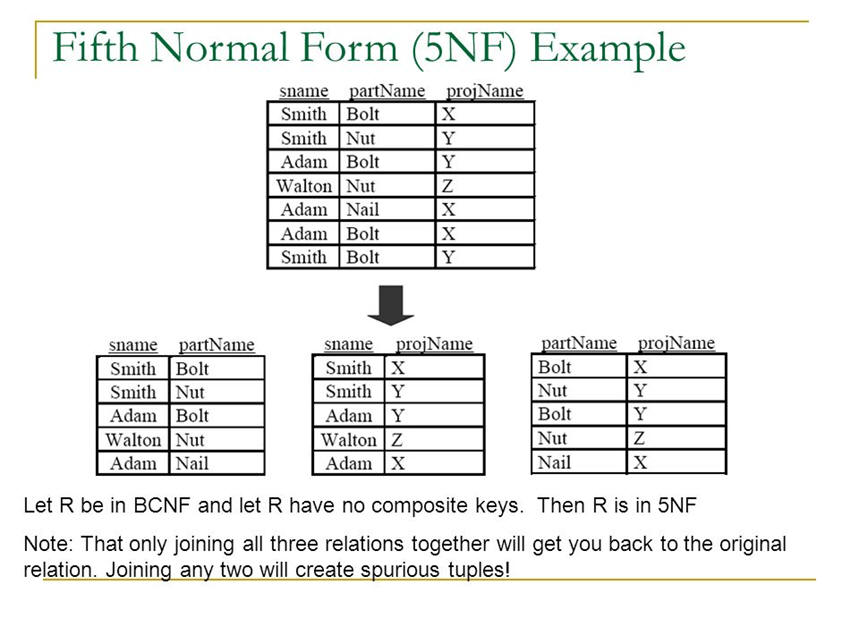
A spurious tuple occurs when 2 tables are joined on columns that aren't primary keys or foreign keys (this is considered bad database design).
6. Sixth Normal Form (6NF) or Domain-key Normal Form
(DKNF)
Every constraint on relationships is dependent on key constraints or column value constraints (domain refers to values allowed within a column) This normal form operates at the relationship level rather than the table level and prevents bad data from being added to tables It also prevents modifications in one table creating inaccurate data in connected tables
To see an example, view: 5NF 6NF Simple.pdf
NOTE: The seven normal forms are: 1NF, 2NF, 3NF, BCNF (Boyce-Codd), 4NF, 5NF and 6NF
Reasons why 4NF-6NF are omitted:
1. Queries require too many joins and slow down performance
2. Updates are infrequent
3. Doesn’t fit business practice
There are 3 types of relationships:
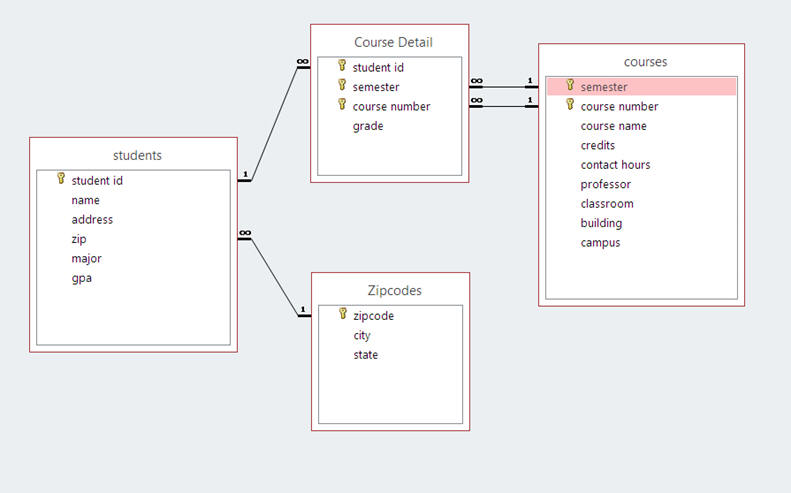
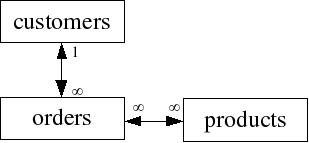
1. One to Many - where one record in a table could be related to many records in the second table. In most diagrams, the infinity symbol is used to represent many
Here's a graphic of a diagram relating several tables
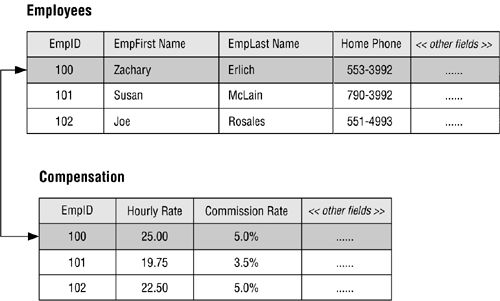
2. One to One - where one record in a table can only relate to one record in another table. In a one-to-one relationship, the primary key is the same in both tables and is used to join the tables.
Example #1 of a one-to-one relationship
Example #2:
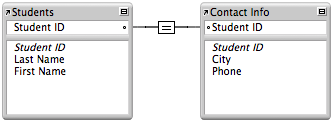
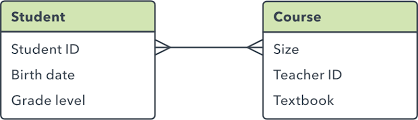
3. Many to Many - where many records in one table connect to many records in another table. When this occurs, you need to break the table down into additional tables.
Example:
E-R Diagrams are used to illustrate how tables are related and to identify many-to-many relationships. In the example below, there are two many-to-many relationships which identify the need for additional tables. Tables developed to eliminate many-to-many relationships are called "bridge" tables. In the example below, a WarehouseProducts table could be developed as a bridge between products and warehouse. An OrderDetails table could be developed as a bridge between order and products
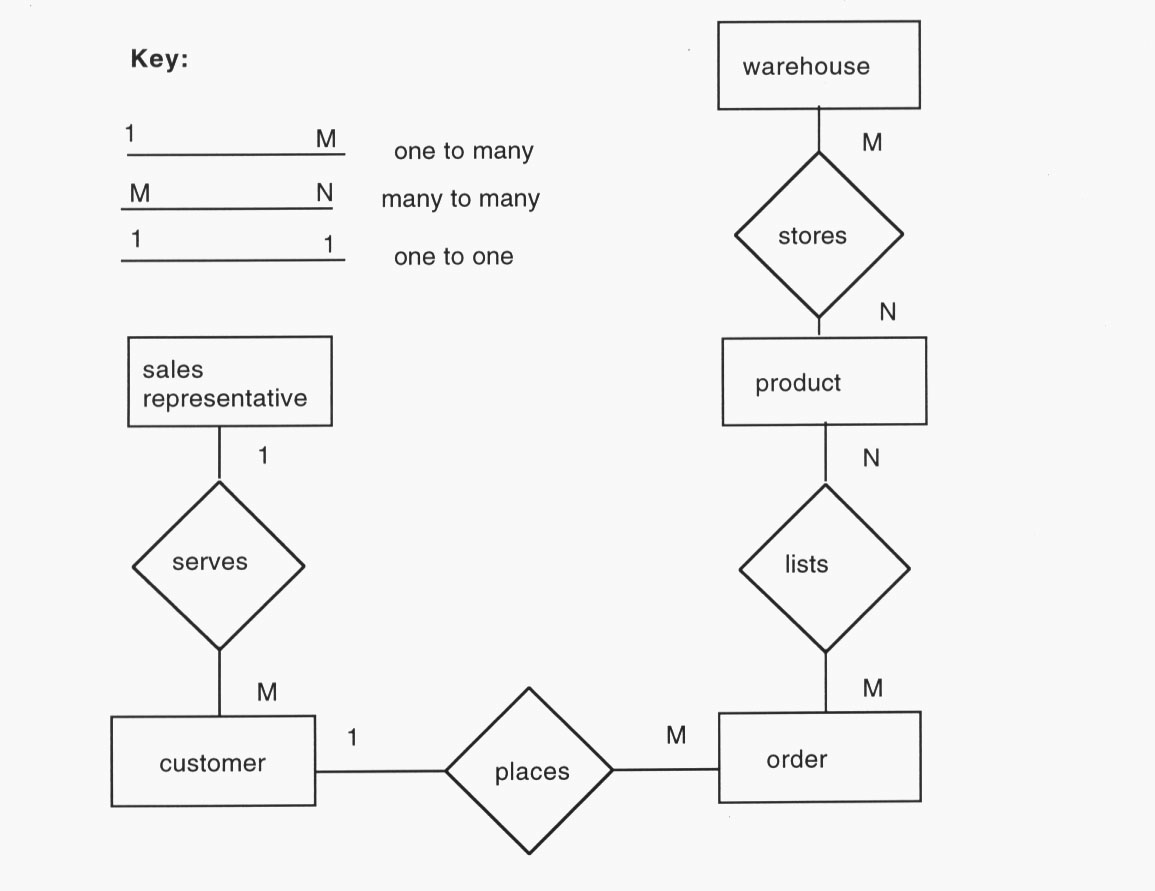
Relationships should be one to one or one to many.
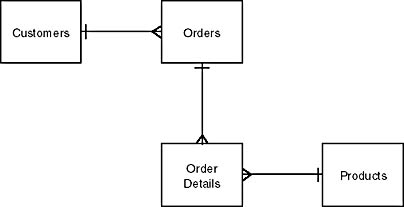
In the example below, we would need to create another table to bridge orders and products because of the many to many relationship. An order detail table would work (the table could include order# from the order table and product# from the product table - both fields would be the key)
Here's how the revised image would look:
It is important when creating tables to think about referential integrity of the tables. Referential integrity rules are designed to ensure data is accurate after changes are made.
The following examples illustrate why referential integrity is important:
1) If a primary key in a table is changed and that column is used as a foreign key in other tables, the foreign key is also changed so everything remains in synch. For example, if a customer number changes, the customer number in the order table would also change.
2) If a primary key is deleted, rows in related tables are also deleted. For example, if a customer is deleted, their orders are also deleted.
3) When tables are related, data must be entered in the “1” table before the “many” table. For example, you cannot add customer orders until you have customers.
4) If a foreign key is updated, their must be a matching value in the primary key table; otherwise, the update is not allowed. For example, you cannot change the customer number in the order table unless the customer exists in the customer table
Now that you understand WHY referential integrity is important, we will discuss how it is created, because it is NOT automatically created in SQL.
In SQL Server, there are 2 ways to create referential integrity:
1) Use declarative referential integrity
or
2) Use triggers
1. Declarative Referential Integrity (DRI)
This is created by defining foreign key constraints that indicate how referential integrity between tables is enforced (we will be covering this in ch 11 and 12)
2. Triggers
A trigger is a special kind of stored procedure that automatically executes when an event occurs (we will be covering these in ch 15)
By default, SQL server (and most other RDMS systems) will index tables by the primary key allowing quick retrieval of data.
If you ask SQL to retrieve data by a column that is not the key and is not indexed, SQL performs a table scan which involves searching through the entire table (the equivalent of looking in every page of a book for something because the index isn’t there). As you can imagine, with a lot of data, this is a slow process.
Indexes can be clustered or nonclustered. Each table can have 1 clustered index (which is typically the primary key) and up to 249 non-clustered indexes. You can change clustered indexes from the primary key to a different column if you want to (there is nothing that prevents that). Rows are stored in tables based upon the clustered index.
SQL allows composite indices made up of 2 or more columns. You should only consider doing this if the data in the columns doesn’t change very often and the columns are used in a lot of queries.
A few things to keep in mind about indexes include:
• they cannot be used in search conditions that use the LIKE operator or with patterns containing wildcards
• they can’t be used in search conditions that use functions or expressions
• they should be used sparingly because they have to be updated everytime a changes is made to data the index is based upon (if a column changes a lot, it isn’t a good candidate for an index)
Columns should be indexed when:
• the column is a foreign key
• the column is used in frequent searches (or selects)
• the column contains a large number of distinct values
• the column is NOT updated frequently (frequent updates require rebuilding the index)